
This document is a mobile phone user manual, which introduces how to turn on and off, switch languages, make calls, receive calls, save and view phonebook entries, use the camera (animation and snapshot), make international long distance calls, etc.
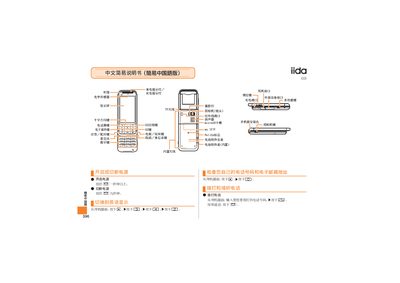
The manual provides step‑by‑step instructions for operating the iida G9 mobile phone. It covers basic functions such as answering and making calls, saving and viewing contact lists, and using the built‑in camera for photos and animations.
Additional sections describe how to set silent mode, record voice memos, and navigate the phone’s menus. Each operation is shown with the required key presses from the standby screen, making it easy for users to follow. This manual is written in Chinese.
When the phone rings, press the answer key.
From the standby screen, press and hold the mute key for more than one second.
From the standby screen, press and hold the save key for a few seconds.
From the standby screen, press the photo key (marked as 四).