
This is a user manual for a mobile phone, including how to turn on, turn off, switch language, make phone calls, receive phone calls, save and view phone book lists, take pictures and snapshots, and make international long distance calls.
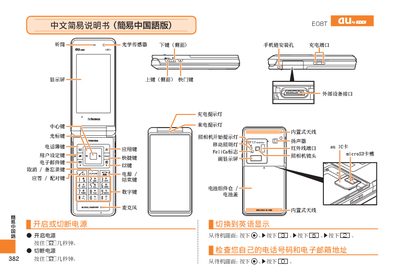
The Sharp E08T phone manual provides step‑by‑step instructions for basic operations such as making and ending calls, answering incoming calls, and managing contact lists. It also describes how to use the built‑in camera for photos and animations, as well as how to record voice memos and enable mute mode.
Each section includes clear button‑press sequences and visual cues, helping users quickly become familiar with the device’s functions without needing extensive technical knowledge. This manual is written in Chinese.
From the standby screen, enter the phone number you want to dial and press the call button.
Press the end‑call button during a call.
When the phone rings, press the answer button.
In photo mode, press the capture button to take a snapshot.