
The TCON-SA2 support arm is designed to hold both a 3x extension lens and an E-10 series digital camera equipped with a B-HLD10 power battery holder. If the power battery holder is not attached to the camera, use the TCON-SA1 support arm, which is provided with the 3x extension lens.
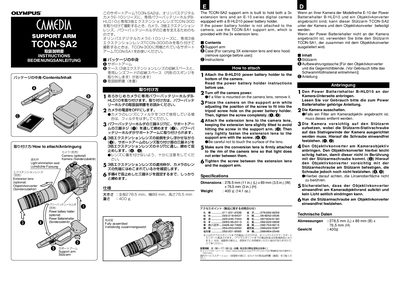
The TCON‑SA2 support arm is designed to hold a 3× extension lens and an Olympus E‑10 series digital camera equipped with the B‑HLD10 power battery holder. The manual explains how to install the arm, attach the extension lens, and secure the battery holder.
The package includes the support arm, a case for the lens and hood, and this instruction booklet. Installation steps cover attaching the battery holder, turning off the camera, aligning tripod screws, and tightening the arm. Technical specifications such as dimensions and weight are also listed. This manual is written in Japanese.
| Length | 278.5 mm |
|---|