
Key facts
- Manuals
- 8
- Languages
- EN · JA
- Last added
- 2023-10-19
Featured Kobe University manuals
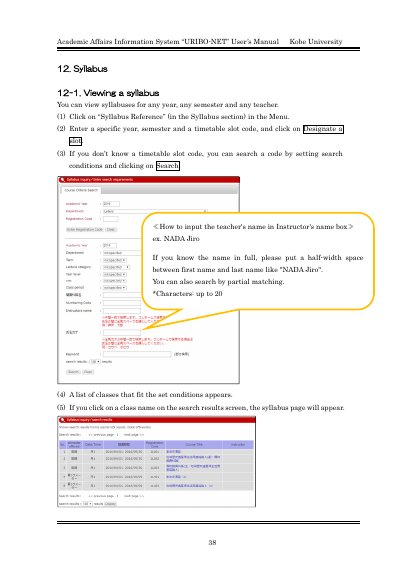
Kobe University URIBO-NET Syllabus Viewing and Registration Manual
This manual explains how to view, print, and register syllabi using Kobe University's Academic Affairs Information System, URIBO-NET. Users can search for syllabi by year, semester, and timetable slot, or by instructor name. Printing requires Adobe Reader. Registration is limited to designated periods and includes options for creating or importing syllabi with language, formatting, and content specifications. Automatic saving is enabled during creation sessions.
Covers: Viewing a Syllabus · Printing a Syllabus · Registering a Syllabus · Importing an Existing Syllabus · Importing a File · Saving and Finalizing a Syllabus
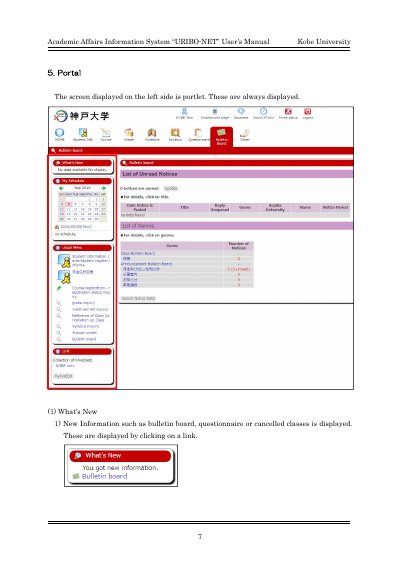
Kobe University URIBO-NET Academic Affairs Information System User Manual
This document is the User's Manual for the Academic Affairs Information System known as URIBO-NET, developed for Kobe University. It provides instructions for navigating the system's interface, which includes portlets for displaying new information and managing schedules.
The guide details specific functions such as viewing the 'What's New' section for bulletin boards and class updates, managing the 'My Schedule' calendar, and accessing the 'Usual Menu' set by administrators. It also covers how users can register personal links via the 'MylinkEdit' button.
Covers: What's New · My Schedule · Usual Menu · Link · MylinkEdit · Add Link
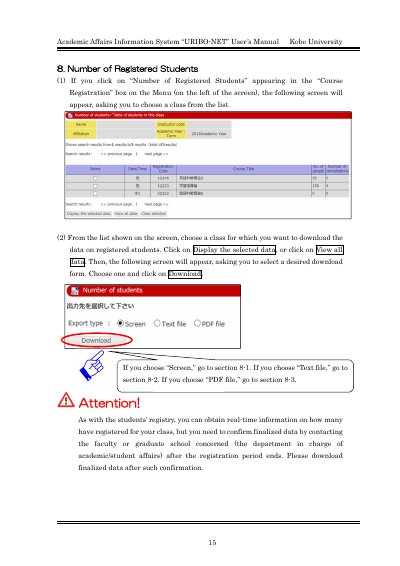
Kobe University URIBO-NET Academic Affairs Information System User's Manual
This document serves as the User's Manual for the Academic Affairs Information System known as URIBO-NET at Kobe University. It provides instructions for accessing and downloading data regarding the number of registered students.
The guide details three specific methods for downloading student data: viewing it directly on the screen, exporting it as a text file compatible with Excel, or saving it as a PDF file. It also notes that PDF viewing requires the Adobe Reader software.
Covers: Number of Registered Students · Download Screen · Download Text file · Download PDF file · Adobe Reader requirement
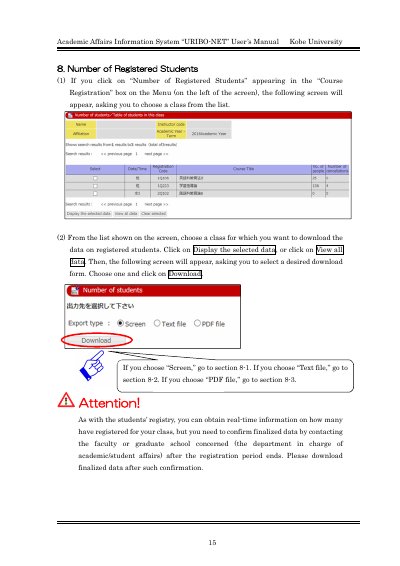
Kobe University URIBO-NET Academic Affairs Information System User Manual
This document serves as the user manual for the Academic Affairs Information System known as URIBO-NET at Kobe University. It provides instructions for accessing specific data regarding the number of registered students within the Course Registration module.
The guide details three distinct methods for downloading student registration data: viewing the data directly on the screen, exporting it as a text file compatible with Excel, or downloading it as a PDF file. Users are advised to confirm finalized data with the relevant faculty or graduate school before downloading.
Covers: Number of Registered Students · Downloading data to view it on the screen · Downloading data in the form of a text file · Downloading data in the form of a PDF file · Viewing PDF files
Latest Kobe University manuals
Kobe University URIBO-NET Syllabus Viewing and Registration Manual
User Manual 9 pages · 1 MB · ENUser guide for viewing, printing, and registering syllabi via Kobe University's URIBO-NET system.
Kobe University URIBO-NET Academic Affairs Information System User Manual
User Manual 4 pages · 366 KB · ENThis manual explains how to use the URIBO-NET Academic Affairs Information System at Kobe University, covering features like What's New, My Schedule, and…
Kobe University URIBO-NET Academic Affairs Information System User's Manual
User Manual 3 pages · 285 KB · ENThis manual explains how to use the URIBO-NET system to download student registration data in Screen, Text file, or PDF formats.
Kobe University URIBO-NET Academic Affairs Information System User Manual
User Manual 3 pages · 285 KB · ENThis manual explains how to query and download data on registered students from the URIBO-NET system at Kobe University in various formats.
Kobe University URIBO-NET Course Registration System User Manual
User Manual 7 pages · 288 KB · JAUser guide for Kobe University's URIBO-NET system for course registration and schedule management.
Kobe University URIBO-NET User's Manual
User Manual 8 pages · 651 KB · ENUser guide for Kobe University's academic registration system URIBO-NET, covering class registration, schedule management, and PDF download.
Kobe University URIBO-NET Academic Affairs Information System User Manual
User Manual 4 pages · 379 KB · ENThis manual explains how to use the URIBO-NET system at Kobe University to download student registers in screen, text, or PDF formats.
Kobe University URIBO-NET Student User Manual
User Manual 49 pages · 4.2 MB · ENOfficial user guide for the Kobe University URIBO-NET academic affairs system, covering login, class registration, grade viewing, and portal functions.
Which document do I need?
User Manual
Day-to-day operation, settings and troubleshooting. Start here if the product is already set up.
Questions answered in Kobe University manuals
How do I view a syllabus?
Click on 'Syllabus Reference' in the Menu, enter year, semester, and timetable slot code, then click 'Designate a slot'.
From: Kobe University URIBO-NET Syllabus Viewing and Registration Manual
What software do I need to print a syllabus?
Adobe® ReaderTM is required to view and print PDF syllabi.
From: Kobe University URIBO-NET Syllabus Viewing and Registration Manual
What information is displayed in the 'What's New' section?
This section displays new information such as bulletin boards, questionnaires, or cancelled classes.
From: Kobe University URIBO-NET Academic Affairs Information System User Manual
How do you view the details of a schedule item?
You must click the specific date under the calendar to display the detail of the schedule.
From: Kobe University URIBO-NET Academic Affairs Information System User Manual
What software is required to view the downloaded PDF file?
Adobe ReaderTM must be installed in your computer to view the PDF file.
From: Kobe University URIBO-NET Academic Affairs Information System User's Manual
What software is required to view the PDF download format?
Viewing a PDF file requires Adobe Reader to be installed in your computer.
From: Kobe University URIBO-NET Academic Affairs Information System User's Manual