
Key facts
- Brand
- Kenwood
- Model
- VR-405
- Documents
- 3
- Languages
- EN
- Last added
- 2023-10-19
Start here
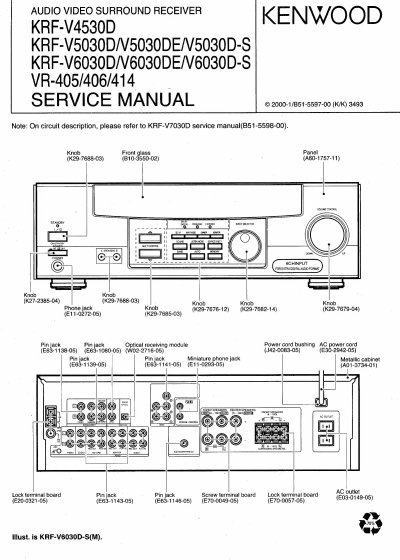
Kenwood KRF-V4530D/V5030D/V6030D/VR-405/406/414 Audio Video Surround Receiver Service Manual
This service manual covers the KRF-V4530D, KRF-V5030D, KRF-V6030D, VR-405, VR-406, and VR-414 audio video surround receivers. It provides detailed information on accessories, cautions, controls, and block diagrams specific to these models. Users should note that functions and terminal details may differ between models, such as the VR-407 and KRF-V7030D which have different remote control units and terminal configurations compared to the VR-405/414 and KRF-V5030D/V4530D series.
Read onlineKenwood VR-405 specifications
| Models Covered | KRF-V4530D, KRF-V5030D, KRF-V6030D, VR-405, VR-406, VR-414 |
|---|---|
| Remote Control Units | RC-RO609 (VR-407, KRF-V7030D), RC-RO509 (VR-405, VR-414, KRF-V5030D, KRF-V4530D) |
| Display Indicators | AUTO, SOUND, BAND, PRO LOGIC, DIGITAL, DIRECT, AUTO, MEMO, STEREO, MONITOR, DOWN MIX ST., TUNED, MIC, MONITOR, Speaker selection, Input channel, Output channel |
| Memory Backup Function | Power mode, Input selector settings, Device preset, Picture output, Speaker ON/OFF, Volume level, BASS, TREBLE, INPUT level, Subwoofer ON/OFF, Dimmer level, Monitor ON/OFF, MD/TAPE settings, 6CH/2CH input setting, Listen mode setting, Speaker settings, Input mode setting, Midnight mode setting, Broadcast band, Frequency setting, Preset stations, Tuning mode |
Source: Kenwood KRF-V4530D/V5030D/V6030D/VR-405/406/414 Audio Video Surround Receiver Service Manual
All Kenwood VR-405 documents by type
Disassembly, diagnostics and part numbers, for repair.
Questions answered in these manuals
What happens if the power cord is disconnected for approximately 3 days?
The following items will be deleted from the unit's memory: Power mode, Input selector settings, Device preset, Picture output, Speaker ON/OFF, Volume level, BASS, TREBLE, INPUT level, Subwoofer ON/OFF, Dimmer level, Monitor ON/OFF, MD/TAPE settings, 6CH/2CH input setting, Listen mode setting, Speaker settings, Input mode setting, Midnight mode setting, Broadcast band, Frequency setting, Preset stations, Tuning mode.
From: Kenwood KRF-V4530D/V5030D/V6030D/VR-405/406/414 Audio Video Surround Receiver Service Manual
What models does this service manual cover?
The manual covers VR-407, VR-406, VR-405, VR-414, KRF-V7030D, KRF-V6030D, KRF-V5030D, and KRF-V4530D.
From: Kenwood KRF-V4530D/V5030D/V6030D/VR-405/406/414 Audio Video Surround Receiver Service Manual
What models does this service manual cover?
This manual covers Kenwood’s KRF-V4530D, V5030D, V6030D, and VR-405/406/414 audio/video surround receivers.
From: Kenwood KRF-V4530D/V5030D/V6030D/VR-405/406/414 Audio Video Surround Receiver Service Manual
What remote control units are included with these models?
VR-407 and KRF-V7030D models use RC-RO609; VR-405, VR-414, KRF-V5030D, and KRF-V4530D models use RC-RO509.
From: Kenwood KRF-V4530D/V5030D/V6030D/VR-405/406/414 Audio Video Surround Receiver Service Manual
What happens to the receiver's memory if the power cord is disconnected for approximately 3 days?
The following items will be deleted from the unit's memory: Power mode, Input selector settings, Device preset, Picture output, Speaker ON/OFF, Volume level, BASS, TREBLE, INPUT level, Subwoofer ON/OFF, Dimmer level, Monitor ON/OFF, MD/TAPE settings, 6CH/2CH input setting, Listen mode setting, Speaker settings, Input mode setting, Midnight mode setting, Broadcast band, Frequency setting, Preset stations, Tuning mode, and Memory back up function.
From: Kenwood KRF-V4530D/5030D/6030D/VR-405/406/414 Service Manual
How do you switch the VIDEO 2/MONITOR jacks from VIDEO 2 to MONITOR mode?
To use the jacks as MONITOR jacks, hold down the MONITOR key of the main unit for more two seconds so that the MONITOR indication appears.
From: Kenwood KRF-V4530D/5030D/6030D/VR-405/406/414 Service Manual