
Key facts
- Brand
- Kenwood
- Model
- V5030DE
- Category
- Other Electronics
- Documents
- 2
- Languages
- EN
- Last added
- 2023-10-19
Start here
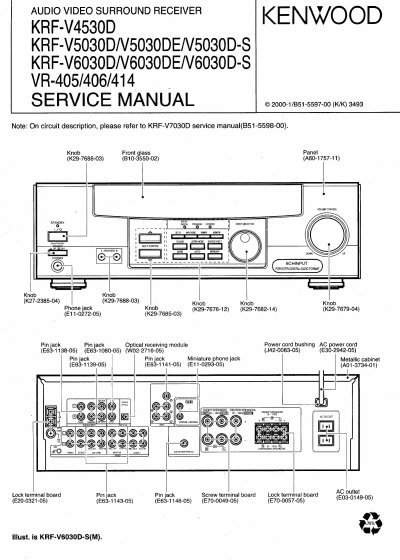
Kenwood KRF-V4530D KRF-V5030D/V5030DE/V5030D-S KENWOOD KRF-V6030D/V6030DE/V6030D-S VR-405/406/414 user manual
This document is a service manual for Kenwood audio video surround receivers, specifically models KRF-V4530D, KRF-V5030D, KRF-V5030DE, KRF-V5030D-S, KRF-V6030D, KRF-V6030DE, KRF-V6030D-S, VR-405, VR-406, and VR-414. It provides technical information including a list of accessories, cautions, control descriptions, block diagrams, circuit descriptions, and adjustment instructions. For circuit descriptions, users are directed to refer to the KRF-V7030D service manual.
Read onlineAll Kenwood V5030DE documents by type
Disassembly, diagnostics and part numbers, for repair.
Questions answered in these manuals
What happens to the receiver's memory if the power cord is disconnected for approximately 3 days?
The following items will be deleted from the unit's memory: power mode, input selector settings, device preset, picture output, speaker ON/OFF, volume level, bass, treble, input level, subwoofer ON/OFF, dimmer level, monitor ON/OFF, MD/tape settings, 6CH/2CH input setting, listen mode setting, speaker settings, input mode setting, midnight mode setting, broadcast band, frequency setting, preset stations, tuning mode, and memory back up function.
How do you switch the VIDEO 2/MONITOR jacks to MONITOR mode?
To use the VIDEO 2/MONITOR jacks as MONITOR jacks, hold down the MONITOR key of the main unit for more two seconds so that the indication shown below appears.
Which models are covered by this manual?
The manual covers the VR-407, VR-406, VR-405, VR-414, KRF-V7030D, KRF-V6030D, KRF-V5030D, and KRF-V4530D.
From: Kenwood KRF-V4530D/V5030D/V5030DE/V6030D/V6030DE/V6030D-S VR-405/406/414 Service Manual
How do I reset the microcomputer if it malfunctions?
For U.S.A. and Canada, unplug the power cord and plug it back in while holding down the POWER key.
From: Kenwood KRF-V4530D/V5030D/V5030DE/V6030D/V6030DE/V6030D-S VR-405/406/414 Service Manual