
The Victor 6237P/6238P digital stroboscopic tachometer user manual explains operation, specifications, and measurement procedures.
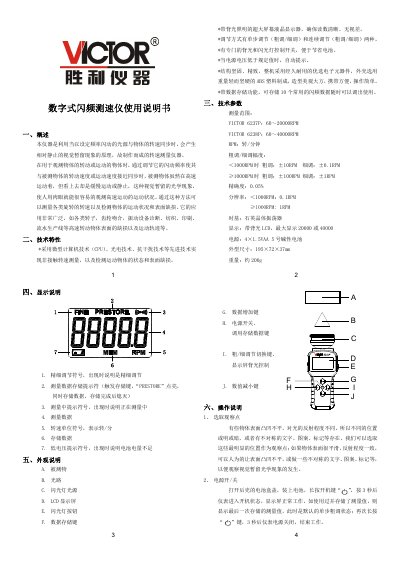
The Victor 6237P/6238P is a digital stroboscopic tachometer that uses a flashing light synchronized with the rotation speed of a target to create a visual‑persistence effect, allowing the user to observe high‑speed motion as if it were stationary. It is suitable for measuring rotational speed, monitoring motion conditions, and detecting surface defects on a wide range of rotating objects such as rotors, gears, and production line components.
The instrument features a back‑lit LCD display, fine and coarse adjustment modes, data storage for up to ten preset speeds, and low‑voltage warning. Operation includes powering on by long‑pressing the power key, adjusting speed with UP/DOWN keys, switching between fine and coarse adjustment, and storing or recalling measurement values using the MEM and READ keys. This manual is written in Chinese.
| Measurement range | 6237P: 60–20 000 RPM, 6238P: 60–40 000 RPM |
|---|---|
| Accuracy | 0.05 % |
| Resolution | <1000 RPM: 0.1 RPM, ≥1000 RPM: 1 RPM |
| Time base | Quartz crystal oscillator |
| Display | Back‑lit LCD, up to 20 000 or 40 000 RPM |
| Power supply | 4 × 1.5 V AA alkaline batteries |
| Dimensions | 195 × 72 × 37 mm |
| Weight | ≈200 g |
Press and hold the power key for about 3 seconds; the instrument will start and show the last stored measurement.
When the battery voltage falls below the specified limit, a low‑voltage symbol appears on the lower‑left corner of the display.