
The Smart Badminton Sensor user manual explains how to download the app, install, charge, power on, connect, and shut down the sensor.
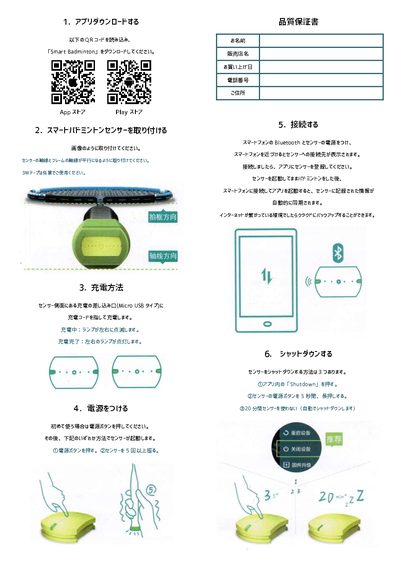
This manual provides step‑by‑step instructions for using the Smart Badminton Sensor. It covers downloading the Smart Badminton app, attaching the sensor so its axis aligns with the racket frame, and optional use of 3 M tape.
It also describes how to charge the sensor via its Micro USB port, power it on for the first use, connect it to a smartphone via Bluetooth, and shut it down using three possible methods. The sensor can sync recorded data to the cloud when an internet connection is available. This manual is written in Japanese.
| Charging port | Micro USB type |
|---|---|
| Charging indicator | Lamps flash left/right while charging, stay lit when complete |
| Shutdown methods | App button, long‑press power button, or 20‑minute inactivity |
Connect a charging cable to the Micro USB port on the sensor side; the lamps will flash left and right while charging and stay lit when fully charged.
Press the power button once, then either press the button again or shake the sensor five times to start it.
Turn on Bluetooth on the phone and the sensor’s power; when the phone is near, the sensor appears in the Bluetooth list—select it and register it in the app.
You can shut it down by pressing “Shutdown” in the app, holding the power button for three seconds, or leaving it unused for 20 minutes, which triggers automatic shutdown.