
Guide for teachers and IT administrators on installing and deploying SMART Learning Suite 18 on Windows using the MSI package and SMART Install Manager.
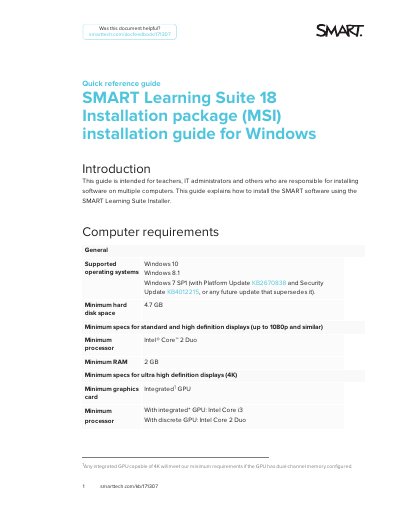
This quick reference guide is intended for teachers, IT administrators and others responsible for installing software on multiple computers. It explains how to install SMART Learning Suite 18 on Windows using the SMART Learning Suite Installer and the MSI installation package.
The guide covers computer requirements, downloading SMART Learning Suite and SMART Install Manager from the SMART website, extracting the Support folder, selecting products and options, publishing an SLS.mst file, and deploying the MSI package to a single computer or multiple computers.
| Supported operating systems | Windows 10; Windows 8.1; Windows 7 SP1 (with Platform Update KB2670838 and Security Update KB4012215, or any future update that supersedes it) |
|---|---|
| Minimum hard disk space | 4.7 GB |
| Minimum processor | Intel Core 2 Duo |
| Minimum RAM | 2 GB |
| Minimum RAM for ultrahigh definition displays (4K) | 4 GB |
| Recommended RAM for ultrahigh definition displays (4K) | 8 GB |
Windows 10, Windows 8.1, and Windows 7 SP1 with Platform Update KB2670838 and Security Update KB4012215, or any future update that supersedes it.
The guide states a minimum hard disk space of 4.7 GB.
Use a network deployment tool and enter the command msiexec /I SLS.msi TRANSFORMS=SLS.mst /qn.
Installation packages are available as EXE or MSI.