
This document provides installation instructions, technical specifications, and warranty information for the NETGEAR GS308 8-port Gigabit Ethernet switch.
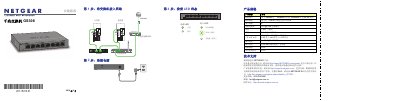
This guide details the installation process for the NETGEAR GS308 Gigabit switch. It covers connecting the device to the network via RJ-45 ports using Cat 5e or better cables, powering on the unit with a 12V adapter, and checking LED status indicators. This manual is written in Chinese.
| Network Interface | RJ-45 for 10BASE-T, 100BASE-TX or 1000BASE-T |
|---|---|
| Cable Type | Cat 5e or better Ethernet cable |
| Power Adapter Input | 12V @ 0.5A DC |
| Maximum Power Consumption | 3.8W |
| Weight | 0.4 kg (0.88 lbs) |
| Dimensions | 158 x 102 x 26 mm |
| Operating Temperature | 0–40° C (32–104° F) |
You should visit the NETGEAR website to register your product after installation.
The switch requires a Cat 5e or better Ethernet cable.