
Netgear DG834 Router Configuration Guide

Step-by-step configuration guide for the Netgear DG834 router, covering login, PPPoE setup, and ADSL settings.

Netgear DG834 Router Configuration Guide - cover page
Brand
NETGEAR
Category
Router
Document type
Installation Guide
Language
English
Pages
4
File format
PDF
File size
532 KB
Published
19 November, 2026
Updated
19 November, 2026
Model
DG834
MD5 checksum
2251301F95A009A2B5E13BA37166E468

About this manual

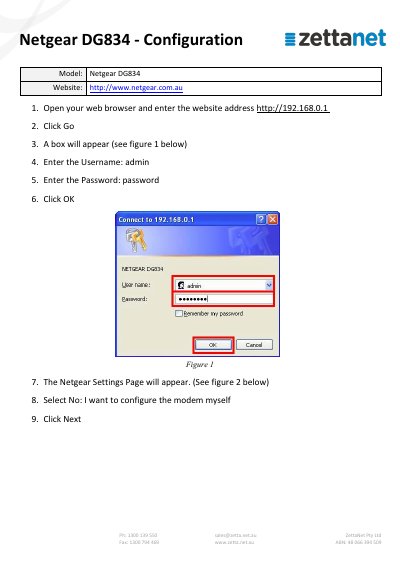
This document is a configuration guide for the Netgear DG834 router. It explains how to open the router settings page in a web browser and log in using the default credentials.

It then describes selecting PPPoE encapsulation, entering the account username and password, and applying ADSL settings with LLC-based multiplexing, VPI 8, and VCI 35.

What's inside

  • Open settings page
  • Log in
  • Configure PPPoE
  • Apply settings
  • Configure ADSL settings

Frequently asked questions

What address is used to open the Netgear DG834 settings page?

http://192.168.0.1

What username is used to log in to the Netgear DG834?

admin

What password is used to log in to the Netgear DG834?

password

What ADSL multiplexing method, VPI, and VCI values are configured?

LLC-Based multiplexing, VPI 8, and VCI 35.

Download PDF (532 KB)

More NETGEAR Manuals


View all NETGEAR manuals →