
This quick start guide explains how to wire the Music Tribe LEVEL4 tabletop volume controller to LUCIA series amplifiers using an RJ45 connector.
The document introduces the LAB.LEVEL4 (also referred to as Music Tribe LEVEL4) Tabletop Volume Controller, designed for commercial installations. It provides high-resolution volume control capable of managing up to four LUCIA series amplifiers simultaneously.
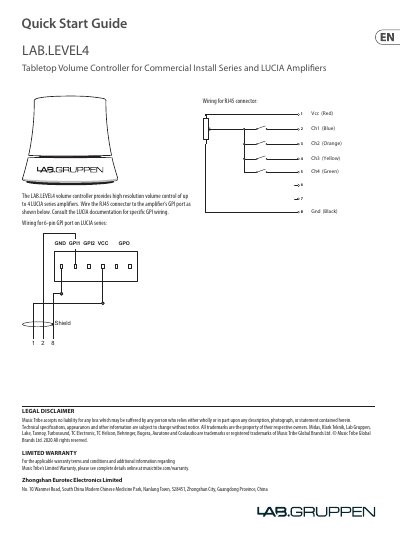
The guide details the physical connection process, specifically instructing users on how to wire the RJ45 connector to the amplifier's GPI port. It includes a specific wiring diagram mapping pins 1 through 8 (GND, VCC, Ch1-Ch4) for both 6-pin and RJ45 configurations.
It provides high resolution volume control of up to 4 LUCIA series amplifiers.
The controller is designed for use with LUCIA series amplifiers.