
This manual provides instructions for charging, Bluetooth pairing, and using the controls of the Music Tribe BB 560M headphones.
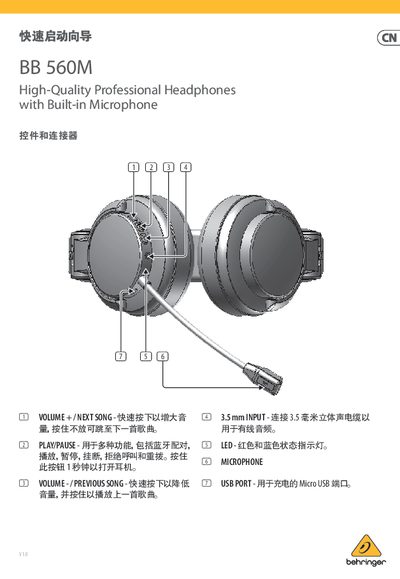
This document serves as the user manual for the Music Tribe BB 560M High-Quality Professional Headphones with Built-in Microphone. It details the functions of the physical controls, including volume adjustment, playback, and call handling. The guide also explains how to charge the device via USB and how to pair it with Bluetooth-enabled devices like smartphones and tablets. This manual is written in Chinese.
| Frequency Response | 20 Hz - 20 kHz |
|---|---|
| Signal-to-Noise Ratio | 80 dB |
| Audio Power Output | 2 x 10 mW |
| Battery Capacity | 185 mAh |
| Charging Time | 2-3 hours |
| Working Time | 7 hours |
Press and hold the PLAY/PAUSE button for 1 second to turn on the headphones.
Hold the PLAY/PAUSE button for 1 second until the LED flashes red and blue alternately, then select 'BB 560M' from the device list.
If a password is required, use '0000'.
It takes at least 4 hours for the first charge, and 2-3 hours for subsequent charges.