
The manual provides quick‑start instructions, software installation steps, and operation details for the Linear Technology Linduino One (DC2026C)…
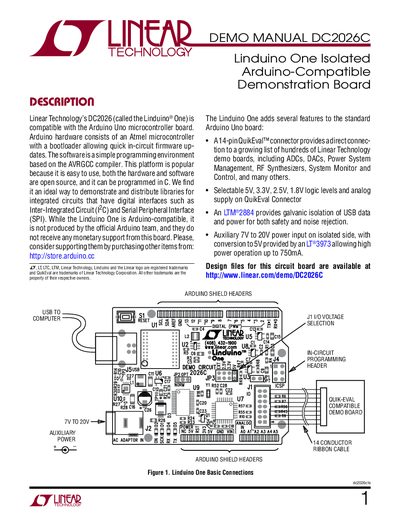
The Linduino One is an isolated Arduino‑compatible demonstration board from Linear Technology. It adds a 14‑pin QuikEval connector, selectable logic levels, and galvanic isolation for USB and power, allowing safe interfacing with a variety of Linear Technology demo boards.
This document walks you through installing the LT Sketchbook, QuikEval software, and the Arduino IDE, setting up the board, and running demo programs with the DC934 demo board. It also includes schematic diagrams, revision history, and safety notices.
| Connector | 14‑pin QuikEval™ connector |
|---|---|
| Logic voltage levels | 5 V, 3.3 V, 2.5 V, 1.8 V selectable |
| Auxiliary power input | 7 V to 20 V on isolated side |
| USB isolation | LT M®2884 provides galvanic isolation |
| Power conversion | LT®3973 converts to 5 V, up to 750 mA |
Download the LT Sketchbook zip file, install QuikEval, and install the Arduino IDE as described in the Quick Start Guide.
The board can be set to 5 V, 3.3 V, 2.5 V, or 1.8 V logic levels.
It accepts an auxiliary 7 V‑20 V input on the isolated side, which is converted to 5 V by an LT®3973 regulator, and can also be powered via USB.
Use the supplied 14‑pin ribbon cable to connect the demo board to the QuikEval connector on the Linduino One.