
Detailed guide for Lenovo's public computer room solution covering hardware limits, software support, installation, network replication and control.
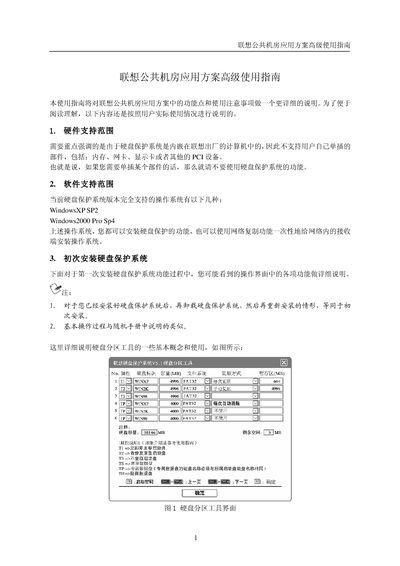
The Advanced Usage Guide explains the features and usage considerations of Lenovo's Public Computer Room Application Solution. It describes hardware support limits, supported operating systems, and the initial installation process for the built‑in disk protection system.
The manual also covers disk partition concepts, different types of boot and data disks, restoration methods, temporary area settings, network replication scheduling, and the network control system used by administrators to manage computers remotely. This manual is written in Chinese.
| Maximum number of logical disks | 48 |
|---|---|
| Visible disks per screen | 6 |
| Temporary area size range | 604M~904M |
| Maximum shared data disks per system | 3 |
| Supported file systems for immediate‑restore boot disks | FAT16, FAT32, NTFS |
| Supported operating systems | Windows XP SP2, Windows 2000 Pro SP4 |
The system fully supports Windows XP SP2 and Windows 2000 Professional SP4.
Up to 48 logical disks can be created, though only six are visible at a time.
The temporary area can be set between 604 MB and 904 MB.
Press F10 → Network Replication → Schedule, then set execution count, time, login wait, and other options before saving.