
Key facts
- Brand
- Juniper Systems
- Model
- Archer 2
- Category
- Other Electronics
- Industry
- Industrial
- Documents
- 2
- Languages
- FR · EN
- Last added
- 2026-11-12
Start here
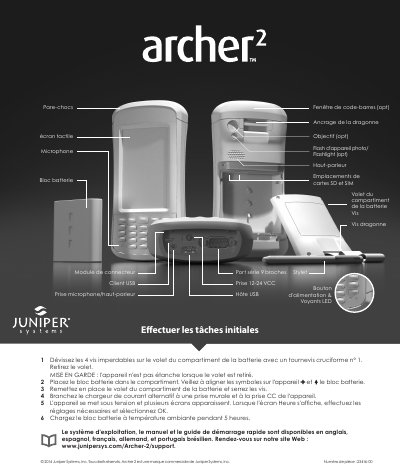
Juniper Systems Archer 2 Quick Start Guide
This document provides step-by-step instructions for the initial setup of the Juniper Systems Archer 2. It details how to install the battery pack, connect the AC charger, power on the device, set the time, and charge the battery for five hours at room temperature.
The operating system, manual, and quick start guide are available in English, Spanish, French, German, and Brazilian Portuguese. Users are directed to the Juniper Systems support website at www.junipersys.com/Archer-2/support for further resources. This manual is written in French.
Juniper Systems Archer 2 specifications
| Battery charging time | 5 hours at room temperature |
|---|---|
| Supported languages | English, Spanish, French, German, Brazilian Portuguese |
| Power input | 12-24 VDC |
All Juniper Systems Archer 2 documents by type
The shortest path to a working setup, usually only a few pages.
Day-to-day operation, settings and troubleshooting. Start here if the product is already set up.
Questions answered in these manuals
How long should I charge the battery before first use?
Charge the battery pack at room temperature for 5 hours.
Where can I find the operating system manual and quick start guide in other languages?
They are available in English, Spanish, French, German, and Brazilian Portuguese on the Juniper Systems support website.
What is the maximum storage capacity for Micro SD/SDHC cards?
The device supports user accessible storage up to 32GB.
From: Juniper Systems Archer 2 Rugged Handheld Owner's Manual
How long does it take to charge the battery pack?
The charging time is between 4 to 5 hours.
From: Juniper Systems Archer 2 Rugged Handheld Owner's Manual