
This manual covers the Haiwell E/S Series PLC, including model specifications, indicator meanings, power requirements, environmental ratings, and wiring…
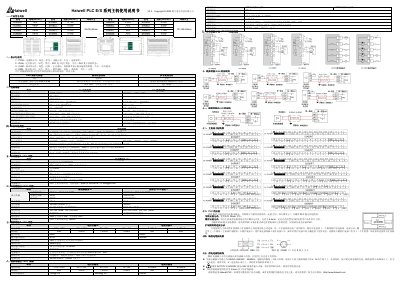
The document is a user manual for the Haiwell E/S Series Programmable Logic Controller (PLC). It provides a list of available models with their power consumption and physical dimensions. The guide details the functions of status indicators such as Power (POW), Run (RUN), Communication (COM), and Error (ERR).
The text includes technical specifications for AC/DC power inputs, environmental operating conditions, and detailed electrical characteristics for digital input/output (DI/DO) and analog input/output (AI/AO) modules. It also provides wiring diagrams for terminal connections, expansion module linking, programming cables, and main power supply. This manual is written in Chinese.
| Dimensions (E16S) | 93x95x82mm |
|---|---|
| Dimensions (S24S/S16M) | 131x95x82mm |
| AC Input Voltage Range | AC 85~265V |
| DC Input Voltage Range | DC 24V -15%~+20% |
| Power Output (Max) | MAX 25VA |
| Operating Temperature | 0~+55 ℃ |
| Digital Input Response Time (Default) | 6.4ms |
| Relay Output Max Load | 2A/1 point, 8A/4 points |
It indicates firmware or user program anomalies, requiring a system upgrade or program modification.
The maximum power output is 25VA.