
ENERMAX 52 Cooler Installation Guide

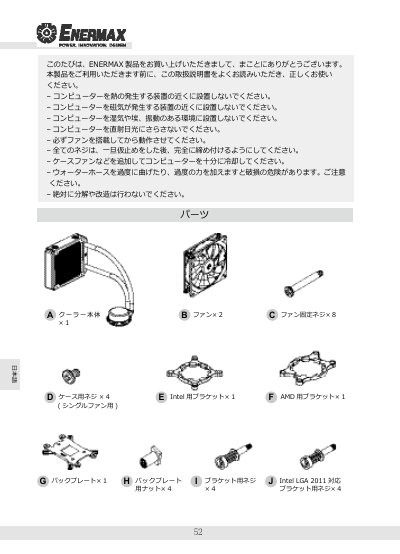
ENERMAX 52 cooler installation guide with parts list, fan speed modes, and Intel/AMD mounting steps.

ENERMAX 52 Cooler Installation Guide - cover page
Brand
ENERMAX
Category
Other Computer Accessories
Document type
Installation Guide
Language
Japanese
Pages
6
File format
PDF
File size
395 KB
Published
12 November, 2026
Updated
12 November, 2026
MD5 checksum
1FE18FED28E38879D699D0653AE5787C

About this manual

This installation guide covers the ENERMAX 52 cooler. It lists the included parts and describes fan speed modes and mounting procedures for Intel and AMD systems.

It also covers radiator and fan assembly, pump and bracket mounting, cable connections, and single-fan use. This manual is written in Japanese.

What's inside

  • Parts list
  • Air flow
  • Fan speed modes
  • Fan and radiator mounting
  • Intel installation
  • AMD installation
  • Pump and bracket mounting
  • Cable connections
  • Single-fan use

Specifications

Fan speed (Silent mode)800-1,500 rpm
Fan speed (Performance mode)800-1,800 rpm
Fan speed (Turbo mode)800-2,200 rpm

Frequently asked questions

Can the cooler be used with one fan?

Yes, do not install the second fan and fix the radiator with the case screws.

Does Intel LGA 2011 require the backplate?

No, LGA 2011 installation does not use the backplate; proceed to Step 5.

Download PDF (395 KB)

More ENERMAX Manuals


View all ENERMAX manuals →