
This document is the user's manual for ENERMAX ECA3331 case, which introduces the appearance of the case, how to install optical drive, how to remove side panel, etc.
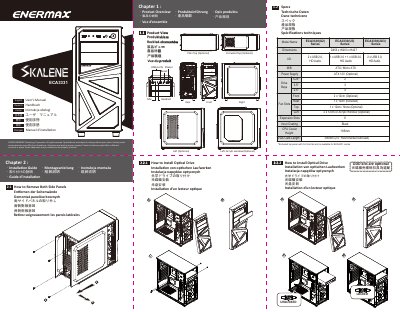
The ENERMAX ECA3331 Series user's manual presents the computer case with product views, a specifications table, and multilingual installation instructions in English, German, Polish, Japanese, Traditional Chinese, Simplified Chinese and French. It covers removing both side panels, installing optical drives, internal 3.5-inch and 2.5-inch devices, add-on cards and system fans, plus cable connections.
The specifications list a D453 x W203 x H427 case with black inner coating, six expansion slots, ATX/Micro ATX motherboard support, optional ATX 12V power supply, and 5.25-inch, 3.5-inch and 2.5-inch drive bays. Fan slots include optional front and top 12 cm positions, an included rear 12 cm fan and optional left-side 12 cm fans or acrylic window. Suggested clearances are 165 mm for the CPU cooler and 390 mm for the VGA card with the 2.5-inch HDD bracket removed.
| Dimensions | D453 x W203 x H427 |
|---|---|
| Inner Coating | Black |
| Expansion Slots | 6 |
| Motherboard Support | ATX / Micro ATX |
| Power Supply | ATX 12V (Optional) |
| Front Fan Slots | 2 x 12cm (Optional) |
| Rear Fan Slot | 1 x 12cm (Included) |
| I/O | 1 x USB 3.0 + 1 x USB 2.0, HD Audio |
| CPU Cooler Height | 165mm |
| VGA Card Length | 390mm (2.5” HDD bracket removed) |
| Drive Bays | 5.25", 3.5", 2.5" |
The case dimensions are D453 x W203 x H427.
The manual suggests a CPU cooler height of 165mm.
The suggested VGA card length is 390mm when the 2.5-inch HDD bracket is removed.
A 12cm fan is included at the rear, while the front fan slots are listed as optional.