
EIZO instructions for installing, removing and cleaning the optional Panel Protector for 54.1 cm (21.3 inch) class LCD monitors, with specifications.
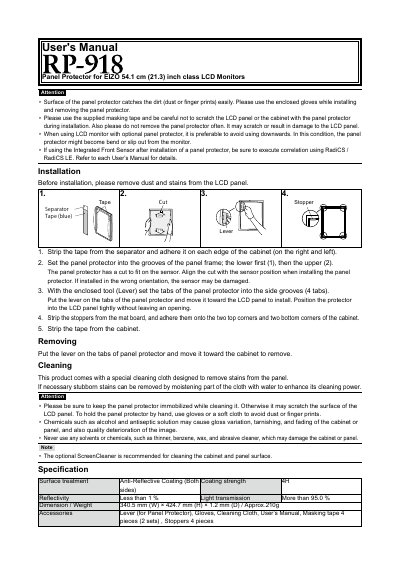
This is the EIZO user's manual for the optional Panel Protector supplied for EIZO 54.1 cm (21.3 inch) class LCD monitors. It explains how to prepare the LCD panel, install the protector so that its cut aligns with the sensor, fix it with the lever, stoppers and masking tape, and how to remove it again.
The manual also covers cleaning with the enclosed cleaning cloth and lists cautions about dirt, downward use of the monitor and the chemicals that must not be used. A specification table gives the anti-reflective coating, coating strength, reflectivity, light transmission, dimensions, weight and the supplied accessories.
| Surface treatment | Anti-Reflective Coating (Both sides) |
|---|---|
| Coating strength | 4H |
| Reflectivity | Less than 1 % |
| Light transmission | More than 95.0 % |
| Dimensions (W x H x D) | 340.5 mm × 424.7 mm × 1.2 mm |
| Weight | Approx. 210 g |
| Compatible monitor size | 54.1 cm (21.3 inch) class LCD monitors |
| Accessories | Lever (for Panel Protector), Gloves, Cleaning Cloth, User's Manual, Masking tape 4 pieces (2 sets), Stoppers 4 pieces |
After removing dust and stains from the LCD panel, set the protector into the grooves of the panel frame, lower side first and then the upper side, and use the enclosed lever to set its tabs into the side grooves.
Put the lever on the tabs of the panel protector and move it toward the cabinet.
Yes, use the special cleaning cloth supplied with the product; stubborn stains can be removed by moistening part of the cloth with water.
Do not use alcohol, antiseptic solution, thinner, benzene, wax or abrasive cleaner, as they may damage the cabinet or panel.