
D-Link DIR-865L Router Firmware Upgrade Guide

Step-by-step guide to download and install firmware 1.07 on a D-Link DIR-865L router.

D-Link DIR-865L Router Firmware Upgrade Guide - cover page
Brand
D-Link
Category
Router
Document type
User Manual
Language
English
Pages
9
File format
PDF
File size
939 KB
Published
16 November, 2026
Updated
16 November, 2026
MD5 checksum
23FE945193F9C02BABCE5E02BB41C638

About this manual

Download firmware 1.07 for the D-Link DIR-865L router from the D-Link website and save it. Then extract the downloaded file from the download folder.

Log in to the router at http://dlinkrouter, open Tools > Firmware, select the extracted firmware file, upload it, and wait for the upgrade to finish.

What's inside

  • Download firmware
  • Save downloaded file
  • Log in to router
  • Extract firmware file
  • Upload and complete upgrade

Specifications

Firmware version1.07

Frequently asked questions

How do I download the DIR-865L firmware?

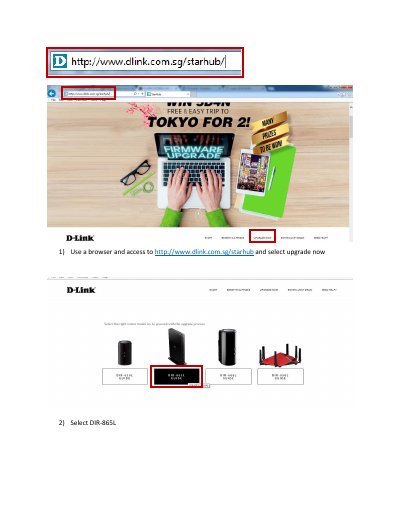
Use a browser to access http://www.dlink.com.sg/starhub, select upgrade now, select DIR-865L, and click download.

Where do I log in to upload the firmware?

Access http://dlinkrouter and log in; by default there is no password.

What firmware version does this guide install?

Firmware 1.07.

Download PDF (939 KB)

More D-Link Manuals


View all D-Link manuals →