
Simple user guide for au Series mobile phones covering basic operations, calls, camera, and settings.
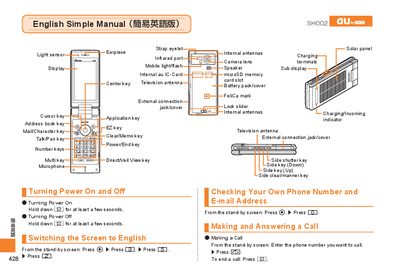
This manual provides step‑by‑step instructions for using an au Series mobile phone. It explains how to turn the device on and off, switch the display language to English, check your own phone number and e‑mail address, and make or answer calls.\n\nAdditional sections cover address‑book management, camera functions for recording movies and taking snapshots, making international calls, and handy features such as Manner Mode and voice memo. The guide also includes information on emoji, predefined text messages, and other useful functions. This manual is written in Japanese.
Hold down the F key for a few seconds to turn the power on or off.
From the standby screen, press c, then 3, then 5, then 2.
Enter the international number (e.g., 212‑123‑xxxx for the USA) and press N to call.