
A simple English guide for operating an au smartphone, covering power, calls, camera, and service information.
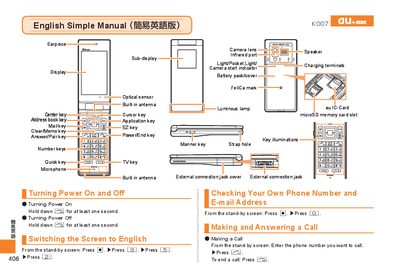
This manual provides step‑by‑step instructions for basic operations of an au smartphone, such as turning the device on and off, making and answering calls, recording video, taking photos, and adjusting settings like Manner Mode. Each function is described with the required key presses and screen navigation.
The document also includes customer‑service contact numbers for both landline and mobile callers, as well as recycling information for the handset and its manual. It is written in simple English with bilingual headings for Japanese users.
Hold down the power key [| for at least one second.
Hold down the power key, then press the Record button [加] to start recording and press [加] again to stop.
Hold down the power key, then press the Shoot button [本] to capture a photo.