
Key facts
- Manuals
- 3
- Languages
- JA · EN
- Last added
- 2026-10-03
Featured AU manuals
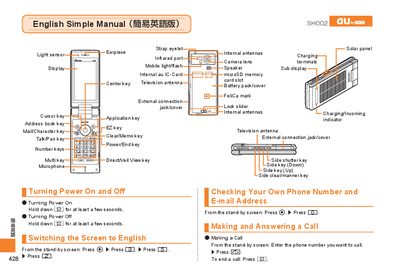
au Series Mobile Phone User Manual
This manual provides step‑by‑step instructions for using an au Series mobile phone. It explains how to turn the device on and off, switch the display language to English, check your own phone number and e‑mail address, and make or answer calls.\n\nAdditional sections cover address‑book management, camera functions for recording movies and taking snapshots, making international calls, and handy features such as Manner Mode and voice memo. The guide also includes information on emoji, predefined text messages, and other useful functions. This manual is written in Japanese.
Covers: Power On/Off · Switching Screen Language · Checking Phone Number and Email · Making and Answering Calls · Address Book Management · Camera (Movie and Snapshot)
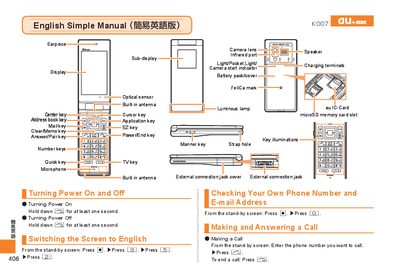
au Smartphone User Manual
This manual provides step‑by‑step instructions for basic operations of an au smartphone, such as turning the device on and off, making and answering calls, recording video, taking photos, and adjusting settings like Manner Mode. Each function is described with the required key presses and screen navigation.
The document also includes customer‑service contact numbers for both landline and mobile callers, as well as recycling information for the handset and its manual. It is written in simple English with bilingual headings for Japanese users.
Covers: Turning Power On · Turning Power Off · Making a Call · Answering a Call · Storing an Entry · Recording a Movie Clip
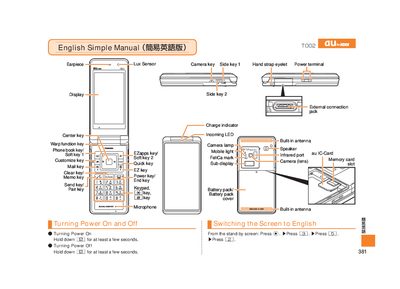
au Mobile Phone User Manual
The manual explains how to turn the phone on and off, make and answer calls, store and recall address‑book entries, and use the camera for photos and video clips. It also describes how to set the Manner Mode, use the Easy Voice Memo, and adjust volume during calls.
Additional sections give the international dialing format, how to change between photo and movie modes, and contact information for au customer service, including toll‑free numbers for landline and mobile callers.
Covers: Power On/Off · Making a Call · Answering a Call · Address Book Management · Camera Operation · International Calls
Latest AU manuals
au Series Mobile Phone User Manual
User Manual 21 pages · 5.6 MB · JASimple user guide for au Series mobile phones covering basic operations, calls, camera, and settings.
au Smartphone User Manual
User Manual 21 pages · 4.3 MB · ENA simple English guide for operating an au smartphone, covering power, calls, camera, and service information.
au Mobile Phone User Manual
User Manual 16 pages · 12.3 MB · ENThis user manual provides basic instructions for operating an au mobile phone, covering power, calls, address book, camera, and international dialing.
Which document do I need?
User Manual
Day-to-day operation, settings and troubleshooting. Start here if the product is already set up.
Questions answered in AU manuals
How do I turn the phone on and off?
Hold down the F key for a few seconds to turn the power on or off.
How can I switch the screen language to English?
From the standby screen, press c, then 3, then 5, then 2.
How do I turn the phone on?
Hold down the power key [| for at least one second.
How do I record a video clip?
Hold down the power key, then press the Record button [加] to start recording and press [加] again to stop.
How do I turn the phone on?
Hold down the Power key for at least a few seconds.
How do I make an international call?
Enter the international access code, the country code, and then the phone number (e.g., 212‑123‑AAA for the USA).