
This au mobile phone user manual explains how to power the device on/off, make calls, use the camera, and adjust basic settings.
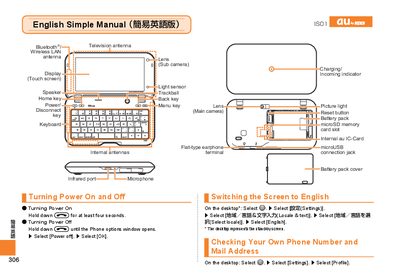
The manual provides step‑by‑step instructions for operating the au mobile phone. It covers powering the phone on and off, switching the display language to English, checking your own phone number and email address, and using basic functions such as dialing, answering calls, and managing the address book.
Additional sections describe how to record video clips or take snapshots with the built‑in camera, make international calls, and configure handy features like Manner Mode and Answer Memo. The guide also lists the phone’s hardware components such as the touch screen, camera lenses, microphone, and various ports. This manual is written in Chinese.
Hold down the f key for at least four seconds.