
ASRock PG27FF1A Gaming Monitor Quick Start Guide

This guide provides quick setup instructions for the ASRock PG27FF1A gaming monitor, covering installation, cable connections, and safety information.
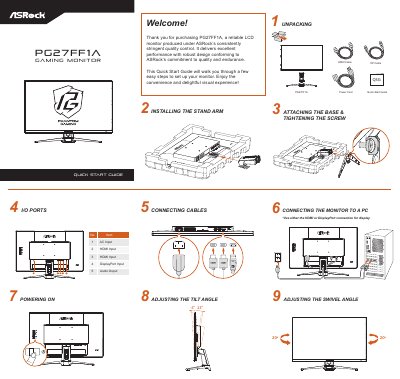

ASRock PG27FF1A Gaming Monitor Quick Start Guide - cover page
Brand
ASRock
Category
Monitors
Document type
Quick Start Guide
Language
Chinese
Pages
2
File format
PDF
File size
8.6 MB
Published
18 October, 2026
Updated
18 October, 2026
MD5 checksum
CD4D06EFA52FE29E28E60CBCE435BBF4

About this manual

This Quick Start Guide assists users in setting up the ASRock PG27FF1A gaming monitor. It covers unpacking, installing the stand arm and base, connecting cables to the PC, and powering on the device. The guide also includes instructions for adjusting the tilt and swivel angles. This manual is written in Chinese.

What's inside

  • Unpacking
  • Installing the Stand Arm
  • Attaching the Base
  • Connecting Cables
  • Powering On
  • Adjusting the Tilt Angle
  • Adjusting the Swivel Angle
  • I/O Ports
  • Safety Information

Frequently asked questions

Which cables are included in the package for connecting the monitor?

The package includes a Power Cord, an HDMI Cable, and a DP Cable.

Download PDF (8.6 MB)

More ASRock Manuals


View all ASRock manuals →