
AMX NXA-WAP1000 smart wireless access point installation guide covering setup, PoE power, Ethernet ports, LED indicators, specifications, and configuration.
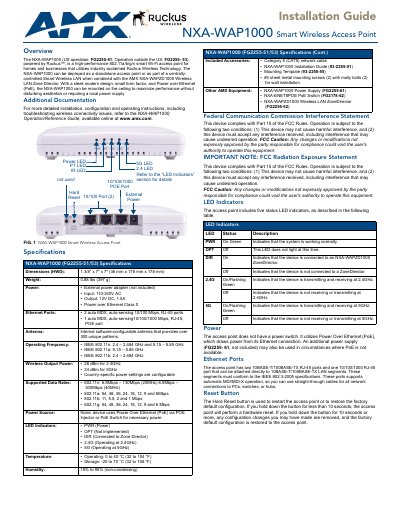
AMX NXA-WAP1000 is a high-performance 802.11a/b/g/n smart Wi-Fi access point for homes and businesses, powered by Ruckus Wireless Technology. It can be deployed as a standalone access point or as part of a centrally controlled Smart Wireless LAN with the AMX NXA-WAPZD1000 Wireless LAN Zone Director. Its small form factor and Power over Ethernet support ceiling mounting without a local power supply.
This installation guide covers hardware installation, Ethernet and PoE connections, LED indicators, reset button operation, computer setup, web login, and initial wireless configuration. For detailed installation, configuration, operating instructions, and troubleshooting, refer to the NXA-WAP1000 Operation/Reference Guide available at www.amx.com.
| Dimensions | 1 3/8 in x 7 in x 7 in (36 mm x 178 mm x 178 mm) |
|---|---|
| Weight | 0.88 lbs (397 g) |
| Power input | 110-240V AC |
| Power output | 12V DC, 1.5A |
| Ethernet ports (10/100) | 2 auto MDX, auto-sensing 10/100 Mbps, RJ-45 ports |
| Ethernet ports (10/100/1000) | 1 auto MDX, auto-sensing 10/100/1000 Mbps, RJ-45, PoE port |
| Antenna | Internal software-configurable antenna with over 300 unique patterns |
| Operating frequency | 802.11n: 2.4-2.484 GHz and 5.15-5.85 GHz; 802.11a: 5.15-5.85 GHz; 802.11b: 2.4-2.484 GHz |
| Wireless output power | 26 dBm at 2.4 GHz; 24 dBm at 5 GHz |
| Supported data rates | 802.11n: 6.5-130 Mbps (20 MHz), 6.5-300 Mbps (40 MHz); 802.11a/g: 6-54 Mbps; 802.11b: 1-11 Mbps |
| Operating temperature | 0 to 40 °C (32 to 104 °F) |
| Storage temperature | -20 to 70 °C (32 to 158 °F) |
| Humidity | 15% to 95% (non-condensing) |
| Power source | Power over Ethernet (PoE) via PoE injector or PoE switch |
| LED indicators | PWR, OPT, DIR, 2.4G, 5G |
Hold the Hard Reset button for 10 seconds or more to remove configuration changes and restore the factory default configuration; holding it for less than 10 seconds performs a hardware reset.
The default username is admin and the default password is 1988.
Connect a computer directly to one of the access point's ports, set the computer's IP address in the 192.168.0.x range, then open https://192.168.0.1 in a web browser.
It has no power switch and uses Power over Ethernet (PoE); an optional external power supply (FG2255-61, not included) can be used where PoE is unavailable.