
The Dell computer user manual introduces the configuration and advanced options of the Dell computer and provides contact information for Dell.
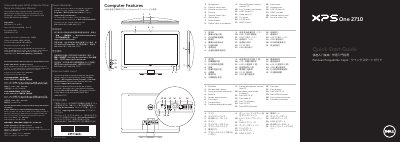
This Dell quick start guide covers the XPS One 2710 computer (regulatory model W06C, type W06C001). A numbered diagram tour of the computer identifies the microphone, camera and camera-cover latch, infrared-receiver lens, camera-status light, optical drive and eject button, power button, volume/display-settings controls, 8-in-1 media-card reader, USB 3.0 ports, audio ports, TV-in port, S/P DIF port, HDMI-in and HDMI-out ports, power port, network port, infrared-emitter port and security-cable slot.
The guide then walks through setup: connect the power cable, set up the wireless keyboard and mouse, locate and record your Service Tag, press the power button, and complete Windows setup while recording your Windows password. It also gives Dell support and contact links, a page of NOM (Norma Oficial Mexicana) importer and input-voltage information for Mexico, and closes with a "Before You Contact Support" note. The text appears in English, Spanish, Chinese, Traditional Chinese, Indonesian and Japanese; the document is dated 2013-04 and was printed in China.
| Computer model | XPS One 2710 |
|---|---|
| Regulatory model | W06C (Type W06C001) |
| Input voltage | 100 to 240 VAC |
| Input frequency | 50 Hz / 60 Hz |
| Rated output current | 3.6 A |
| Media-card reader | 8-in-1 media-card reader |
| USB 3.0 ports | 2 ports (9) and 4 ports (18) |
Click Start → All Programs → Dell Help Documentation, or go to support.dell.com/manuals.
Go to dell.com/ContactDell; customers in the United States can call 800-WWW-DELL (800-999-3355).
The regulatory model is W06C, type W06C001, computer model XPS One 2710.
Locate your Service Tag and record it in the space provided in the guide.