
Dell Computer Setup Guide

This document describes how to set up a Dell computer.
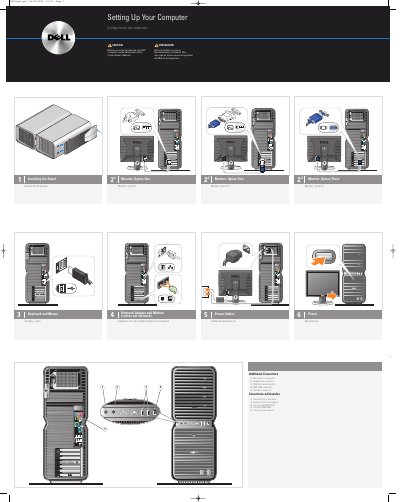

Dell Computer Setup Guide - cover page
Brand
DELL
Category
Desktops
Document type
Quick Start Guide
Language
English
Pages
2
File format
PDF
File size
3 MB
Published
25 November, 2023
Updated
25 November, 2023
MD5 checksum
BB706D8661A9F98996F3475A0D7B2D88

About this manual

The Dell Computer Setup Guide provides basic instructions for the initial hardware configuration of a Dell computer. It covers the installation of the monitor stand and the connection of essential peripherals.

The guide details the connection of keyboards, mice, network adapters, modems, and power cables, as well as various additional connectors including USB 2.0 and IEEE 1394 ports.

What's inside

  • Installing the Stand
  • Keyboard and Mouse
  • Network Adapter and Modem
  • Power Cables
  • Additional Connectors
  • Microsoft Media Center
  • Dell TV

Specifications

USB Connectors2.0 (2)

Frequently asked questions

Where can I find additional setup instructions?

Additional setup instructions can be found in the Owner's Manual.

What should I review before setting up and operating the computer?

Review the safety instructions in your Owner's Manual.

What does the guide say about cables for the network adapter and modem?

The cables are not included.

What should I do if I purchased a Dell TV and want to use it as my monitor?

See the setup instructions that came with the TV.

Download PDF (3 MB)

More DELL Manuals


View all DELL manuals →