
The Dell™ Dimension™ 1100/B110 User's Manual provides information on the various components of the Dell™ Dimension™ 1100/B110 computer and their functions.
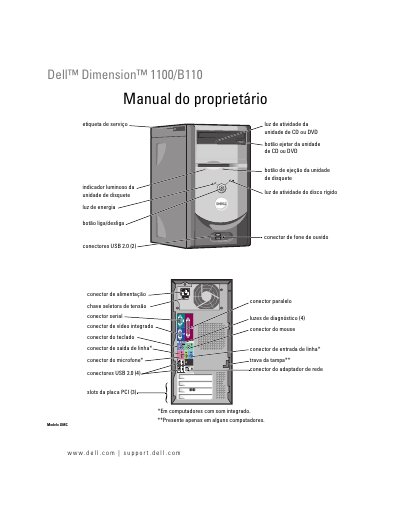
This is the Portuguese-language owner's manual (Manual do proprietário) for the Dell Dimension 1100/B110 desktop computer, document model DMC, September 2006, part number WD496 Rev. A04. It describes the computer's front and rear panels, including keyboard, mouse, USB 2.0, audio, parallel, serial, network adapter and video connectors, the voltage selector switch, and the four diagnostic lights.
The manual explains how to set up a printer, home or office network and Internet connection, how to play and copy CDs and DVDs, and how to troubleshoot problems with drives, memory, mouse, network, power, printer, scanner, sound and video. Advanced troubleshooting sections cover the diagnostic lights and Dell Diagnostics, drivers, and restoring the operating system with Windows XP System Restore, Dell PC Restore by Symantec or the operating system CD. A parts section covers removing the computer cover and installing memory, PCI cards, drives and the battery, followed by an appendix with specifications, System Setup configuration, cleaning instructions and FCC notices. This manual is written in Portuguese.
| USB 2.0 connectors (rear) | 4 |
|---|---|
| USB 2.0 connectors (front) | 2 |
| PCI card slots | 3 |
| Diagnostic lights | 4 |
| Memory type | DDR |
The manual has a section "Como entrar no System Setup" that explains how to enter the System Setup program and its configuration options.
The appendix includes a section on eliminating forgotten passwords ("Como eliminar senhas esquecidas").
You can use Microsoft Windows XP System Restore, Dell PC Restore by Symantec, or the operating system CD, as described in the manual.
The manual has a diagnostic lights section that explains the four diagnostic lights on the back panel and the corresponding error messages.