
The Dell OptiPlex 5055 Small Form Factor Quick Start Guide provides information on how to set up and use your Dell OptiPlex 5055 Small Form Factor computer.
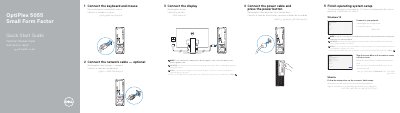
This two-page quick start guide for the Dell OptiPlex 5055 Small Form Factor walks through connecting the keyboard and mouse, an optional network cable, the display, and the power cable, then pressing the power button. It notes that if the computer was ordered with a discrete graphics card, the display should be connected to that card.
The guide then covers finishing operating system setup for Windows 10 or Ubuntu, including connecting to a network, signing in to a Microsoft account or creating a local account, and following the on-screen instructions. It also lists Dell apps, SupportAssist, system features and ports, and Dell support, contact, and regulatory links.
| Computer model | OptiPlex 5055 SFF |
|---|---|
| USB ports | USB 3.1 Gen1 ports; USB 2.0 ports (supports Smart Power On); USB 2.0 port with PowerShare |
| PS/2 ports | PS/2 keyboard port; PS/2 mouse port |
| Serial port | Serial port |
| Network port | Network port |
| Expansion slots | Expansion card slots |
| Security slot | Kensington security cable slot |
| Optical drive | Optional |
Connect the display to the discrete graphics card.
Enter the password for the wireless network access when prompted.
Follow the instructions on the screen to finish setup.
SupportAssist checks and updates your computer.