
Dell™ Dimension™ C521 Owner's Manual
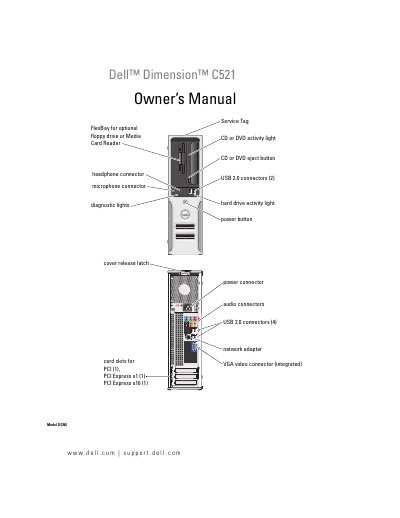
This document is the Owner's Manual for the Dell Dimension C521 desktop computer. It covers the physical description of the system, including front and back views, and explains how to set up the computer, connect peripherals like printers and networks, and use media drives. The guide also details how to adjust system settings such as power management and video display.
| Microprocessor | AMD Athlon 64 X2 Dual-Core processor, AMD Athlon 64, AMD Sempron |
|---|---|
| Memory Type | 533-MHz, 667-MHz, 800-MHz DDR2 SDRAM |
| Memory Connectors | 4 |
| Minimum Memory | 256 MB |
| Maximum Memory | 4 GB |
| Chipset | nVidia GeForce 6150LE |
| Video Type | nVidia integrated video (DirectX 9.0c Shader Model 3.0 Graphics Processing Unit) or PCI Express x16 graphics card |
The manual recommends specific tools before beginning work inside the computer, though the specific list is referenced on page 59.
You can clear forgotten passwords and CMOS settings by following the instructions in the System Setup section, specifically regarding jumper locations.