
The Dell™ Dimension™ 5150/E510 User's Guide provides information on the components, ports, and usage instructions for the computer.
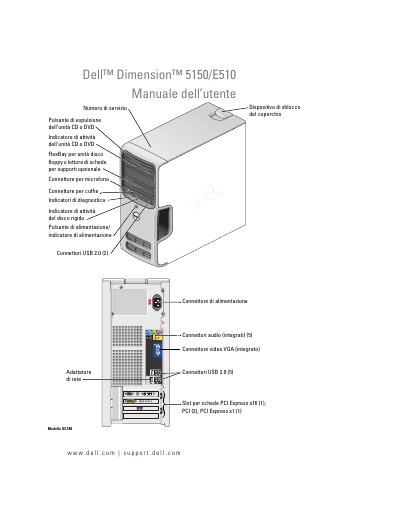
This document is the Italian user manual for the Dell Dimension 5150/E510 desktop computer. It provides instructions on installing and using the computer, connecting peripherals such as printers and monitors, and setting up a home or office network. The guide also details how to manage power settings and use the Hyper-Threading technology.
The manual includes a comprehensive troubleshooting section addressing issues with the battery, optical drives, hard disk, email, and software. It further explains how to use Dell Diagnostics for hardware testing and provides step-by-step instructions for removing and installing internal components like memory, expansion cards, and hard drives. This manual is written in Italian.
| Video connector | VGA (integrated) |
|---|---|
| Network connector | Adattatore di rete |
| Audio connectors | 5 integrated |
| PCI Express x16 slots | 1 |
| PCI Express x1 slots | 1 |
It highlights important information for optimal use of the computer.
It indicates a potential risk of damage to things and people.