
Dell Computer Setup Instructions

Setup instructions for Dell computers
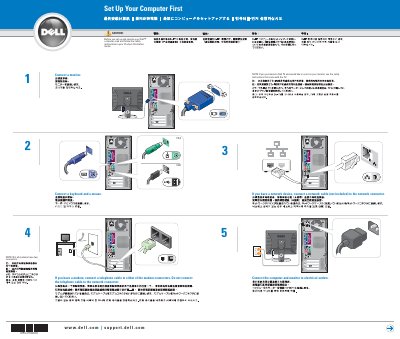

Dell Computer Setup Instructions - cover page
Brand
DELL
Category
Desktops
Document type
Quick Start Guide
Language
English
Pages
2
File format
PDF
File size
1.8 MB
Published
20 November, 2023
Updated
20 November, 2023
MD5 checksum
F1D0D0E8B4B2C7D2DF5606447EF0C70B

About this manual

This Dell setup guide gives numbered steps for connecting a monitor, keyboard, mouse, power, modem or telephone cable, network cable, and speakers before turning on the computer and monitor.

It also notes where to find additional setup instructions, Dell support and educational tools, and how to access the Dimension Help file and Windows XP help.

What's inside

  • Set Up Your Computer
  • Set Up Other Devices

Frequently asked questions

Where can I find additional setup instructions, including how to connect a printer?

See your Owner’s Manual.

Where are support and educational tools available?

On the Dell Support website at support.dell.com.

What should I do if the integrated sound connectors are covered by a cap?

Connect the speakers to the optional sound-card connectors and do not remove the cap.

Download PDF (1.8 MB)

More DELL Manuals


View all DELL manuals →