
Dell Inspiron 5000 Series Notebook Quick Start Guide
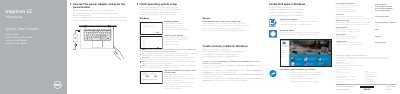
Multilingual quick start guide for the Dell Inspiron 13 7000 Series notebook (computer model Inspiron 13-7359). It shows how to connect the power adapter, finish operating system setup, enable Dell updates, connect to a network, sign in to a Microsoft account, and create Windows recovery media.
The guide also identifies the computer's features and ports, lists shortcut keys, and shows supported modes: Notebook, Tablet, Tent, and Stand. Regulatory information includes model P57G and power ratings.
| Computer model | Inspiron 13-7359 |
|---|---|
| Regulatory model | P57G |
| Input voltage | 100 V AC-240 V AC |
| Input current | 1.30 A/1.60 A/1.70 A |
| Output voltage | 19.50 V DC |
| Output current | 2.31 A/3.34 A |
| Country of origin | China |
In Windows search, type Recovery, click Create a recovery media, and follow the instructions on the screen.
Connect the power adapter and press the power button.
See Specifications at Dell.com/support.
Notebook, Tablet, Tent, and Stand.