
DIALER Seguridad Electrónica SRL La Rioja 827 (C1221ACG) Ciudad de Buenos Aires - Arge
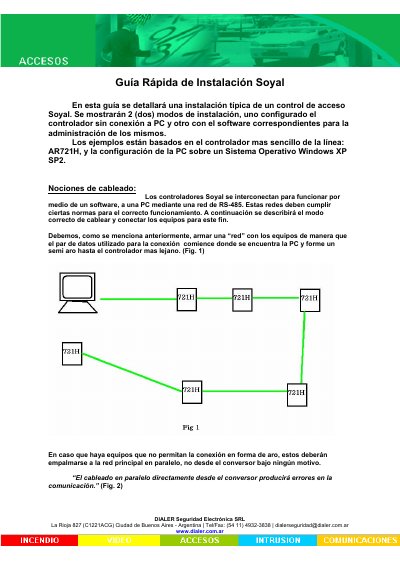
This quick installation guide, distributed by DIALER Seguridad Electrónica SRL in Buenos Aires, describes a typical installation of a Soyal access control system based on the AR-721H controller. It shows two installation modes: the controller configured without a PC connection, and the controller managed with the corresponding software on a Windows XP SP2 PC.
The guide covers RS-485 network cabling rules (semi-ring topology, 120-ohm or UTP cable), connection to the RS-485/RS-232 converter, Node ID and operating mode programming commands, card loading by keypad for modes A, B and C, installation of the 701Server and 701Client applications, user registration in the software, and downloading data to the controllers. This manual is written in Spanish.
| RS-485 cable impedance | 120 ohms (or UTP as replacement) |
|---|
Inside programming mode, enter 00 * XXX # where XXX is the node number, then exit with **#.
The controllers have 3 operating modes; inside programming mode enter 04*X# where X is the mode number.
A single card is loaded with 19 * UUUUU * 00001 # (UUUUU = user number); a series is loaded with 19 * UUUUU * CCCCC #, and the cards must be consecutive for series loading.