
The ML 70DW 1 2 1 2 34 6 5 7 8 9 headphones from Guangdong Takstar Electronic Co., Ltd. feature a dynamic silver-plated and glossy UV-painted earcups design, and an innovative HID control directive that supports long-distance control of music playing software on computers. The volume, previous song, next song, playing and pause functions of the music playing software on computers can be controlled via the button on the headphones. The 2.4G frequency band guarantees accurate sound reproduction and full-duplex for supporting wireless chatting. The wireless operating range is up to 10 meters/360 degrees in open areas. Dyn-Elec technology features an automatic sleep function for reducing power consumption. A built-in rechargeable lithium-ion battery provides up to 9 hours of continuous playtime when fully charged.
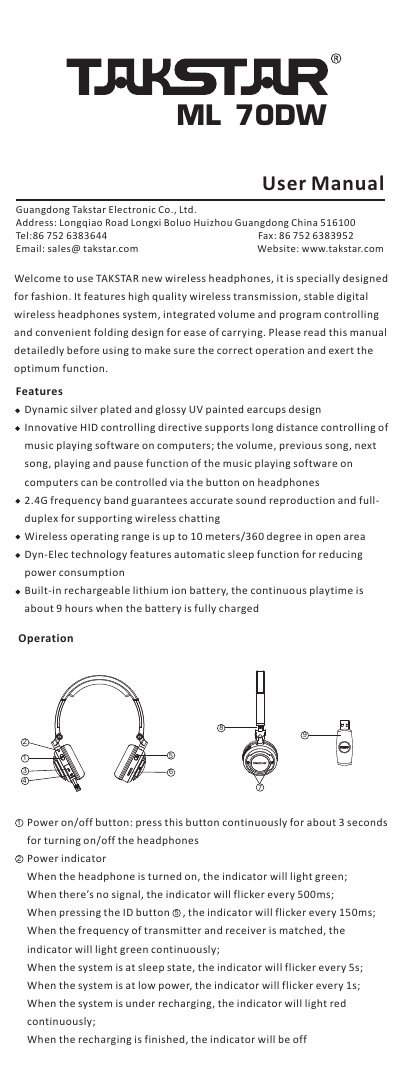
This is the user manual for the Takstar ML 70DW wireless headphones, a 2.4G digital wireless headphone system with built-in rechargeable lithium ion battery, folding design and buttons for controlling music playback on a computer. It explains the power on/off button, the power indicator states, the DC recharging socket, the audio input/output socket, the ID button for frequency matching with the 2.4G wireless transmitter, and the playback and volume controls.
The manual also lists the standard configuration items in the package, including the headphones, 2.4G wireless transmitter, Y-type audio cable, power adaptor, USB power cable, USB extension cable, portable bag and user manual, and ends with the FCC compliance statement.
| Wireless frequency band | 2.4G |
|---|---|
| Wireless operating range | Up to 10 meters / 360 degree in open area |
| Battery type | Built-in rechargeable lithium ion battery |
| Continuous playtime | About 9 hours when fully charged |
Press the power on/off button continuously for about 3 seconds to turn the headphones on or off.
Plug the transmitter into a USB socket of the computer, keep it within 50cm of the headphones and press the ID button; when the LED indicator lights green continuously, frequency matching is finished.
Yes. When the wireless function is turned off, plug audio playing equipment such as an IPOD, MP3 player or computer into the audio socket with an audio cable and the headphone works as a common wired headphone.
The indicator lights red continuously while the system is recharging and turns off when recharging is finished.