
This document describes the installation, connection and operation of the Gigaset DA210.
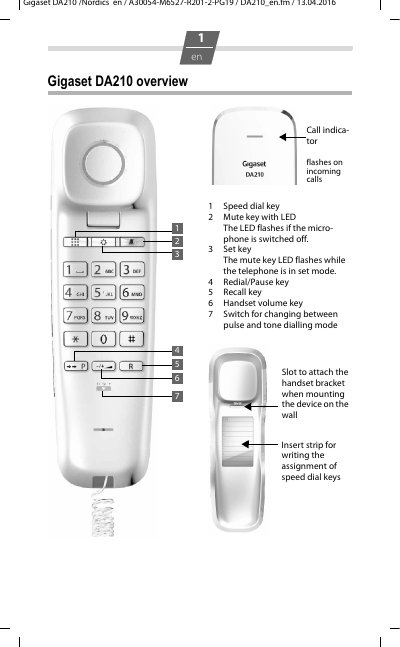
The Gigaset DA210 is a telephone described in this user manual. The document explains how to connect the telephone, mount it on a wall, and use its keys and settings.
It also covers safety precautions, speed dialling and dialling pauses, handset volume, mute, ringer settings, operation on a PABX and public telephone systems, care, and answers to common questions.
| Operating temperature | +5°C to +40°C |
|---|---|
| Speed dial capacity | 10 numbers on keys 0–9, each up to 21 digits |
| Ringer volume | 9 levels or off; factory default level 6 |
| Handset volume | Two levels |
| Dialling modes | Tone dialling (T1/T2) and pulse dialling (P) |
| Wall mounting hole spacing | 85 mm |
| Network connection | Analogue networks |
You can save 10 numbers on the number keys 0–9, each with up to 21 digits.
The two dowel holes should be 85 mm apart vertically.
Check whether mute is activated.