
This manual provides operating instructions, installation steps, and troubleshooting for the Gigaset A120 and A220 wireless DECT phones.
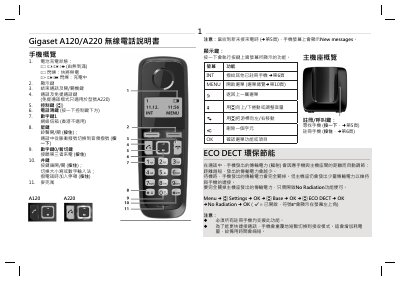
The Gigaset A120 and A220 are cordless DECT telephones designed for home use. The A220 model includes additional features such as hands-free calling, while both models support standard call handling, address book management, and caller ID services provided by the telecommunications carrier.
This guide covers the complete setup process, including connecting the base station to power and telephone lines, installing rechargeable batteries in the handset, and configuring date/time settings. It also details how to register handsets, make and receive calls, use the hands-free function (A220 only), manage call lists, and utilize the address book. This manual is written in Chinese.
| Outdoor Range | 300 meters |
|---|---|
| Operating Temperature | +5 to +45 degrees Celsius |
| Address Book Capacity (A220) | 80 entries |
Place the handset on the base station and charge it for 6.5 hours before first use.
Yes, the A220 model supports hands-free calls using the speaker function.
No, you must use the provided rechargeable batteries; traditional disposable batteries are not allowed.