
Gigaset AS180 is a telephone device with various functions and features, such as checking battery level, calling other registered mobile devices, opening the main menu, etc.
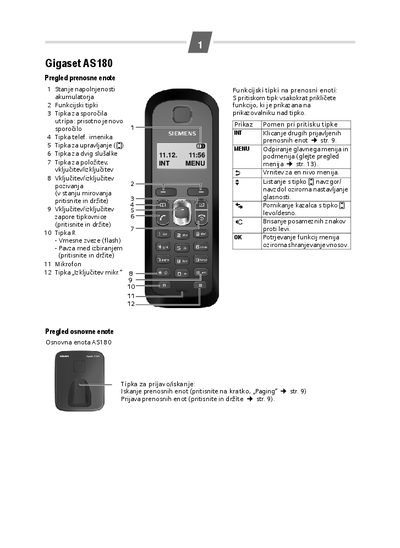
The manual describes the components supplied with the Gigaset AS180 system, including the base unit, power adapter, portable handset (AS18H), batteries and charging cable. It explains how to install the base and power units in a dry indoor environment and how to register each portable handset.
Detailed instructions cover making and receiving calls, using the phonebook, paging, setting date and time, and activating Eco modes to reduce radio emissions. Safety warnings, cleaning guidelines, and procedures for handling water exposure are also provided.
| Maximum range (outdoor) | up to 300 m |
|---|---|
| Maximum range (indoor) | up to 50 m |
| Eco mode emission reduction | 80 % (Eco) or 100 % (Eco+) |
The handset registers automatically; press and hold the registration button on the handset and wait up to five minutes for the process to complete.
Activate Eco mode, which reduces emission by 80 %, or Eco mode+ for a 100 % reduction in standby.