
MS Excel Basic Operations Manual, including how to save files, copy and paste cell content, cut and paste cell content
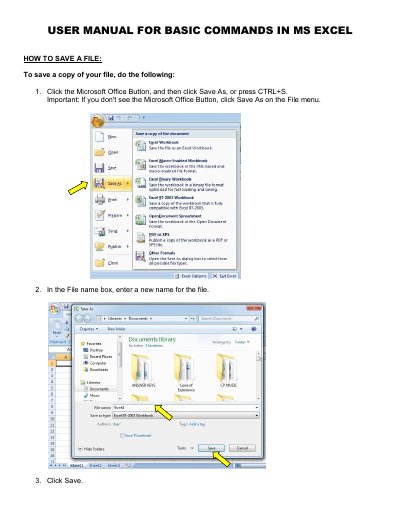
This short user manual covers basic commands in Microsoft Excel. It explains how to save a file or a copy of it, how to copy and paste cell content, and how to cut and paste cell content so that entries are moved rather than duplicated. Each task is given as a numbered set of steps using the Microsoft Office Button, the File menu, the Home tab, or keyboard shortcuts such as CTRL+S, Ctrl+C, Ctrl+V and Ctrl+X.
The final page lists general editing shortcuts in Microsoft Excel, grouped into basic editing within a cell, such as CTRL+Z for undo and CTRL+Y for redo, and shortcuts for reviewing tasks, such as SHIFT+F2 to add or edit a cell comment and CTRL+F2 to display the print preview window.
| Copy shortcut | CTRL+C |
|---|---|
| Paste shortcut | CTRL+V |
| Cut shortcut | CTRL+X |
| Undo shortcut | CTRL+Z |
| Add or edit cell comment shortcut | SHIFT+F2 |
Click the Microsoft Office Button and then click Save As, or press CTRL+S. Then enter a new name in the File name box and click Save.
Select the cells, click Cut on the Home tab or press Ctrl+X, select the destination cells, then click Paste or press Ctrl+V. The cut content is removed from the original cells.
Copying and pasting duplicates cell content, while cutting moves the content between cells.
SHIFT+F2 adds or edits a cell comment.