
This guide provides Microsoft Skype for Business desktop and mobile client users with setup steps and troubleshooting tips for connection issues.
The End User Support Guide helps users of the Skype for Business desktop and mobile clients resolve connection problems after migration from Lync. It explains how to verify login credentials, adjust client settings, and configure server addresses.
Key sections cover desktop client troubleshooting, mobile client installation, advanced configuration options, and contact information for the FirstCall Help Desk.
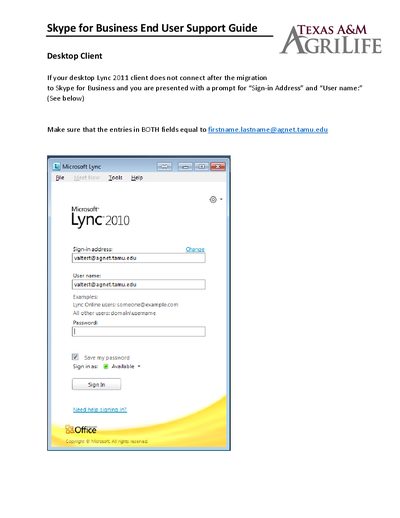
Make sure the Sign‑in Address and User name fields both contain your [email protected].
Select the Options icon, go to the Advanced button on the PERSONAL tab, and choose Automatic Configuration.
Download the Skype for Business app from the app store, enter your AgNet login ([email protected]) and password, then connect.
Enter https://webdir.online.lync.com/Autodiscover/autodiscoverservice.svc/Root in the External and Internal server boxes.