
1-4 channels DMX512/RDM decoder & driver, support DMX512/1990, RDM/2009 protocol, can set DMX address manually in DMX mode, in RDM mode, the host computer address allocation, constant voltage output, maximum current 6A/ch for RGBW decoder, 256 grade brightness adjustment, short circuit protection, overload protection, over-temperature protection, flicker-free
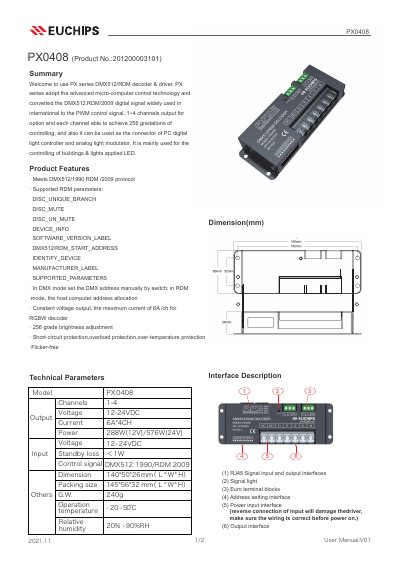
This manual describes the PX0408, a DMX512/RDM decoder and driver that converts DMX512 and RDM/2009 digital signals into PWM control signals for LED lighting. It offers 1-4 output channels with 256 gradations per channel and can serve as the connector between a PC digital light controller and an analog light modulator. It is mainly used for controlling LED lighting in buildings.
The manual lists the product features and technical parameters, describes the interfaces (RJ45 signal input/output, signal light, Euro terminal blocks, address setting interface, power input and output interface), explains DIP switch setting for the DMX address and RDM mode, and provides wiring instructions including the use of CAT-5 or three-core shielded cable and a signal terminal at the end of the connection.
| Control protocol | DMX512/1990, RDM/2009 |
|---|---|
| Output channels | 1-4 channels |
| Maximum current per channel | 6A |
| Input voltage | 12/24V |
| Brightness adjustment | 256 grades |
| Effective DMX address range | 1-511 |
| Terminal resistance (DIP10) | 120 ohm |
| Protections | Short-circuit, overload, over-temperature |
In DMX mode, set it with DIP switches 1-9; the sum of the numbers shown in the address table for the switches set to ON is the first DMX address of the device.
Set the address to 0; the device then defaults to RDM mode, where the host computer allocates the address.
Use CAT-5 cable or a three-core shielded cable, and pay attention to distinguish the positive (+) and negative (-) signal wires when wiring the plug.
DIP10 enables the 120 ohm terminal resistance.