
The Xuanlan Guang TF-MN/TF-CN LED display control card user manual explains hardware connection, software installation, IP configuration, program editing…
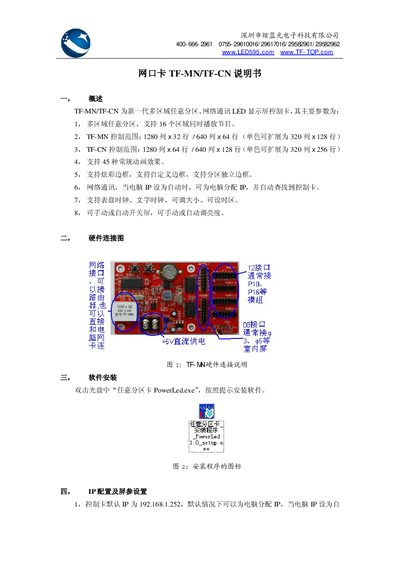
The TF-MN/TF-CN series are next‑generation LED display control cards that support multiple independent zones, network communication, and a variety of animation effects. They can control up to 16 zones simultaneously, with TF‑MN handling 1280×32 or 640×64 pixels and TF‑CN handling 1280×64 or 640×128 pixels.
This manual covers hardware wiring, software setup, IP and screen‑parameter configuration, program creation and sending, advanced network settings, troubleshooting steps, and the physical and electrical specifications of the cards. This manual is written in Chinese.
| PCB length | TF-MN: 105 mm; TF-CN: 110 mm |
|---|---|
| PCB width | TF-MN: 60 mm; TF-CN: 80 mm |
| Horizontal hole spacing | TF-MN: 60 mm; TF-CN: 100 mm |
| Vertical hole spacing | TF-MN: 50 mm; TF-CN: 60 mm |
| Hole diameter | 4 mm |
| Working voltage | +4.5 V – +6 V DC |
| Normal operating current | 200 mA – 300 mA |
| Operating temperature range | -20 °C – 60 °C |
| Operating humidity range | 0 % – 85 % RH (no condensation) |
The control card’s default IP address is 192.168.1.252, and it can assign an IP to the computer when the computer’s IP is set to automatic.
Insert the CD, double‑click the file “PowerLed.exe”, and follow the on‑screen prompts to install the software.