
Key facts
- Manuals
- 7
- Brands
- 1
- Languages
- EN · ZH
- Last added
- 2026-10-01
Featured LED Controller manuals
NovaStar NovaLCT LED Configuration Tool User Manual
This manual provides step‑by‑step instructions for using the NovaLCT LED Configuration Tool on Windows. It covers installing the software, connecting to multimedia players via Ethernet or Wi‑Fi, logging in, and configuring both common and irregular LED screens.
Key sections describe brightness and chroma adjustment, screen monitoring, card management, firmware updates, and troubleshooting. The document also includes FAQs for network proxy settings and no‑sending‑card mode configuration.
Covers: Software Introduction · Software Installation · Device Connection · Screen Configuration · Brightness and Chroma Adjustment · Screen Monitoring
ListenVision LEDPlayer 6.0 Software User Manual
LEDPlayer 6.0 is a high‑performance, single‑color LED display control software released by ListenVision in 2015. It provides a simplified UI, split preview windows, automatic area alignment, instant preview, background animations, USB program file read‑back, and cluster management.
The manual covers screen parameter configuration (including the default password 888), three communication methods (network, serial, USB), basic screen settings such as module selection and dimensions, and step‑by‑step program editing with preview and single‑screen sending. This manual is written in Chinese.
Covers: Introduction · Screen Parameter Settings · Communication Settings · Basic Settings · Program Editing · USB Program File Retrieval
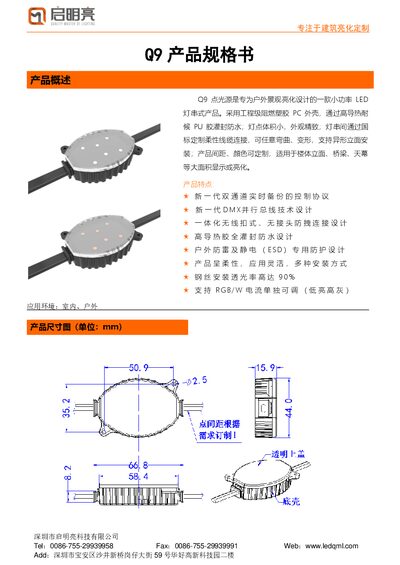
Qimingliang Q9 Point Light Product Specification
The Q9 point light series is a low‑power LED string product designed for outdoor architectural lighting. It features a flame‑retardant PC housing, high‑thermal‑conductivity PU encapsulation for waterproofing, and customizable spacing and colors for large‑area displays such as building facades, bridges and canopies.
Technical data include multiple LED chip options (3535, 5050, 2835), power up to 2.8 W, IP66 protection, and support for both TTL dual‑channel backup and DMX512 control. Installation methods cover PC base mounting, steel‑wire suspension, and profile mounting, with recommended spacing and wiring guidelines. This manual is written in Chinese.
Covers: Product Overview · Technical Parameters · Installation Parts · Installation Methods · System Connection · Company Profile
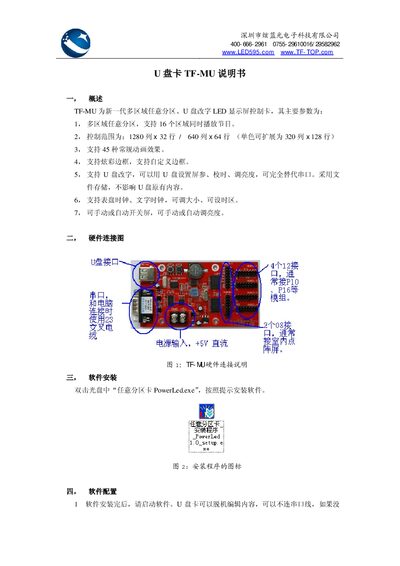
Xuan Bluephotoelectric TF-MU USB Card User Manual
The TF-MU is a next‑generation multi‑region, arbitrary‑partition LED display controller that supports up to 16 zones, various animation effects, and USB‑based configuration. It can replace traditional serial‑port setups and offers clock displays, brightness control, and automatic screen on/off.
This manual covers hardware wiring, software installation (PowerLed.exe), screen parameter configuration, program creation, exporting programs to a USB drive, error‑code explanations, and the physical/electrical specifications of the controller. This manual is written in Chinese.
Covers: Overview · Hardware Connection Diagram · Software Installation · Software Configuration · Program Editing · Export Program to USB
Latest LED Controller manuals
NovaStar NovaLCT LED Configuration Tool User Manual
User Manual 116 pages · 5.6 MB · ENThe NovaStar NovaLCT User Manual explains software installation, device connection, screen configuration, brightness adjustment, monitoring, and…
ListenVision LEDPlayer 6.0 Software User Manual
User Manual 6 pages · 1.3 MB · ZHThe ListenVision LEDPlayer 6.0 software user manual explains installation, screen settings, communication options, and program editing for single‑color LED…
Qimingliang Q9 Point Light Product Specification
Datasheet 8 pages · 1.1 MB · ZHSpecification sheet for the Q9 LED point light series by Qimingliang, detailing dimensions, electrical parameters and installation options.
Linear LT3795 LED Controller
The LT
Xuan Bluephotoelectric TF-MU USB Card User Manual
User Manual 5 pages · 400 KB · ZHThe TF-MU USB Card manual explains hardware connections, software setup, program editing, and troubleshooting for the multi‑region LED display controller.
EQ1003 LED Strip Controller User Manual
User Manual 16 pages · 461 KB · ZHThe EQ1003 manual explains setup, hardware parameters, and programming of the multifunction LED strip display controller.
EdgeLight AF42 User Manual
User Manual 8 pages · 469 KB · ZHThe EdgeLight AF42 User Manual provides safety guidelines, installation steps, and operating instructions for the AF42 LED lighting panel.
Which document do I need?
User Manual
Day-to-day operation, settings and troubleshooting. Start here if the product is already set up.
Datasheet
Ratings, dimensions and ordering codes, for selection and design work.
Questions answered in LED Controller manuals
How do I set the screen parameters?
Open Settings → Screen Parameter Settings and enter the password “888” to access the screen configuration interface.
What communication methods can I use with LEDPlayer 6.0?
LEDPlayer 6.0 supports three communication modes: network (via LAN), serial port, and USB.
What is the recommended maximum spacing between Q9 point lights?
The recommended maximum spacing is 2.5 meters.
What IP protection rating does the Q9 point light have?
It has an IP66 protection rating.
How do I install the TF-MU software?
Insert the CD and double‑click “任意分区卡 PowerLed.exe”, then follow the on‑screen prompts to install the software.
How can I export a program to a USB drive?
Select the “文件 → 导出到 U盘” menu, choose the desired options, and click “确定保存” to write the program to the USB drive.