
This user guide introduces the connection between Yealink SIP-T28P/T26P IP phones and wireless headsets.
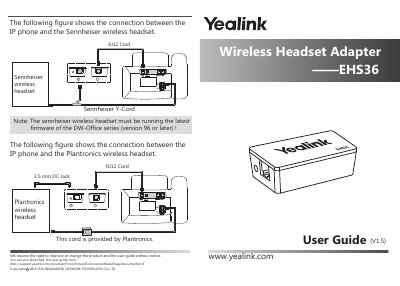
The Yealink EHS36 Wireless Headset Adapter connects Yealink SIP-T48S/T48G/T46S/T46G/T42S/T42G/T41S/T41P/T38G/T29G/T28P/T27P/T27G/T26P IP phones to Sennheiser, Jabra (GN Netcom) and Plantronics wireless headsets. The guide uses the SIP-T28P/T26P IP phone as the example in its connection figures.
Port and cord descriptions cover the RJ12 cord connection to the IP phone EXT/EHS port or Expansion Module EXT port, the RJ45 cord for Jabra/Sennheiser headsets, and the 3.5 mm DC jack for Plantronics headsets. The guide also notes that the Sennheiser wireless headset must run DW-Office series firmware version 96 or later.
| Compatible IP phones | Yealink SIP-T48S/T48G/T46S/T46G/T42S/T42G/T41S/T41P/T38G/T29G/T28P/T27P/T27G/T26P |
|---|---|
| Port 1 connection | Connects to the IP phone EXT/EHS port or Expansion Module EXT port using the RJ12 cord |
| Port 2 connection | Connects to the Plantronics wireless headset using the 3.5 mm DC jack |
| Port 3 connection | Connects to the Jabra (GN Netcom) / Sennheiser wireless headset using the RJ45 cord |
| RJ9 cord | Audio connection between the IP phone headset port and the Jabra (GN Netcom) wireless headset |
| Sennheiser Y-Cord | Audio connection between the IP phone headset port, Wireless Headset Adapter and the Sennheiser wireless headset |
| Sennheiser headset firmware | Latest firmware of the DW-Office series, version 96 or later |
The EHS36 connects Yealink SIP-T48S/T48G/T46S/T46G/T42S/T42G/T41S/T41P/T38G/T29G/T28P/T27P/T27G/T26P IP phones to wireless headsets.
The Sennheiser wireless headset must run the latest firmware of the DW-Office series, version 96 or later.
It connects to port 2 using the 3.5 mm DC jack.
The RJ9 cord connects the IP phone headset port to the Jabra (GN Netcom) wireless headset.