
Yealink EHS36 Wireless Headset Adapter User Guide

This guide explains how to connect the Yealink EHS36 Wireless Headset Adapter to T38G/T28/T26 IP phones and Sennheiser, Plantronics, or GN Netcom/Jabra…
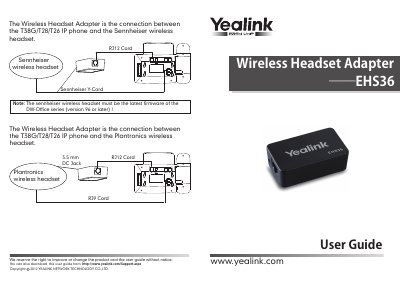

Yealink EHS36 Wireless Headset Adapter User Guide - cover page
Brand
Yealink
Document type
User Manual
Language
English
Pages
2
File format
PDF
File size
4.3 MB
Published
28 October, 2026
Updated
28 October, 2026
MD5 checksum
19C4C818985798AC0AFF03084189CE8A

About this manual

The Yealink EHS36 Wireless Headset Adapter serves as a connection interface between Yealink T38G, T28, and T26 IP phones and various wireless headset brands. It supports Sennheiser (DW-Office series version 96 or later), Plantronics, and GN Netcom/Jabra headsets.

What's inside

  • Port Description
  • Connection Instructions
  • Sennheiser Connection
  • Plantronics Connection
  • GN Netcom/Jabra Connection

Frequently asked questions

Which IP phones is the Yealink EHS36 Wireless Headset Adapter compatible with?

The adapter connects to Yealink T38G, T28, and T26 IP phones.

Which wireless headset brands can be connected using this adapter?

The adapter supports GN Netcom, Jabra, Sennheiser, and Plantronics wireless headsets.

What cord is required to connect the adapter port for a Plantronics Wireless headset?

You must use the 3.5 mm DC jack cord for this connection.

Download PDF (4.3 MB)

More Yealink Manuals


View all Yealink manuals →