
This guide covers installation methods, connection instructions, and compatibility for the Yealink VCC22 video conferencing camera with the VC800 system.
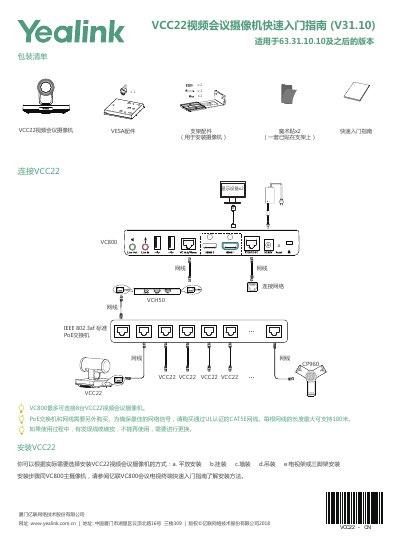
The Yealink VCC22 Video Conferencing Camera Quick Start Guide provides instructions for installing the camera using various methods, including flat surface, wall, ceiling, or tripod mounting. It notes that the installation procedure is the same as that for the VC800 video conferencing system.
| Maximum cameras per VC800 | 8 |
|---|---|
| Ethernet cable standard | UL certified CAT5E |
| Maximum Ethernet cable length | 100 meters |
| Power standard | IEEE 802.3af |
| Firmware version requirement | 63.31.0.10 or later |
The VC800 video conferencing system can connect up to 8 VCC22 video conferencing cameras.
It is recommended to purchase UL certified CAT5E Ethernet cable.
The maximum length of each Ethernet cable is 100 meters.