
4305P active studio monitor user manual, is a new member of JBL's studio monitor speaker series designed for home use, providing detailed information on the speaker's features, usage methods, and maintenance
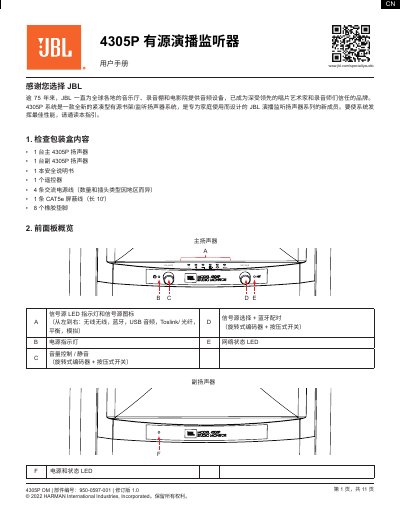
The JBL 4305P is a compact active bookshelf/monitor speaker system designed for home use. This user manual covers the main and secondary speakers, explains the front and back panel controls and connections, and describes placement and bass contour settings.
The manual also gives setup steps for connecting the two speakers by cable or wirelessly, connecting to a network through Ethernet, Google Home, or AirPlay, and disabling or enabling network/Bluetooth functions. This manual is written in Chinese.
| Power input | 100-240 V, 50/60 Hz, 125 W |
|---|---|
| USB service port | 5 V, 350 mA |
| Wired digital link maximum audio quality | 192 kHz / 32 bit |
| Wireless link maximum audio quality | 96 kHz / 24 bit |
| Balanced input sensitivity options | -10 dB and +4 dB |
| Bass contour settings | -3 dB and 0 dB |
Use a CAT5e or higher cable, up to 6 m long, between the DIGITAL LINK connectors on the two speakers; when the connection succeeds, both power LEDs turn yellow.
Check that both speakers are on, then press and hold the Sync button on the secondary speaker and then on the main speaker for more than 3 seconds each; the power LEDs turn green when the connection succeeds.
On the main speaker front panel, press and hold the volume and source buttons for more than 3 seconds; the network LED turns red.