
Skype for Business iOS App Setup Guide

This document is about the setup guide for Skype for Business iOS App
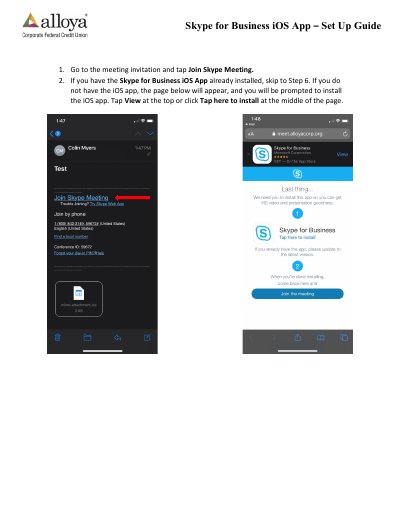

Skype for Business iOS App Setup Guide - cover page
Brand
Microsoft
Category
Smartphones
Document type
User Manual
Language
English
Pages
5
File format
PDF
File size
907 KB
Published
27 October, 2023
Updated
27 October, 2023
MD5 checksum
DACEA3D33A6341BC3E6C3DDD10B9CF60

About this manual

This guide explains how to join a Skype for Business meeting using the iOS app. If the app is not installed, users are directed to download it from the App Store. Once installed, the guide covers the initial setup steps, including granting microphone and camera permissions.

What's inside

  • Join Skype Meeting
  • Install iOS app
  • Allow microphone access
  • Sign In or Join as Guest
  • Join the meeting
  • Turn on video
  • Mute and unmute
  • Change audio output
  • Add contacts
  • Use chat feature

Frequently asked questions

What do I do if I do not have the Skype for Business iOS App installed?

Tap View at the top or click Tap here to install at the middle of the page, then tap Get and install the app.

How do I allow the app to use my microphone?

When prompted with allowing access to the microphone, tap OK.

How do I turn on my video during a meeting?

Tap the Video icon and then tap OK when prompted to allow access to the camera.

Download PDF (907 KB)

More Microsoft Manuals


View all Microsoft manuals →